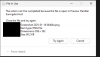
As described in the title I am having issues with VM's deployed via RAS where if a user is using the preview feature in File explorer they are unable to delete files as a pop up saying the following stops the deletion "This action can't be completed because the files is open in Preview Handler Surrogate Host"
I would like this to be fixed on a template level and no turning off preview in file explorer does not fix it
Using Microsoft Power Toys and specifically File Locksmith the Proccess "prevhost.exe" is the one stopping you from deleting the file
Ending the proccess is not suitable as users need to see the preview of files
Any assitance would be appreciated
I would like this to be fixed on a template level and no turning off preview in file explorer does not fix it
Using Microsoft Power Toys and specifically File Locksmith the Proccess "prevhost.exe" is the one stopping you from deleting the file
Ending the proccess is not suitable as users need to see the preview of files
Any assitance would be appreciated