Windows on ARM lacks dll(Dynamic Link Library) files, which results in error.

P

Parallels User

Parallels 17 for M1 chip lacks many dll(Dynamic Link Library) files, which results in error of x86 applications such as matlab, pscad.
 
And my windows 10 version is Insider Preview 10.0.21390.2025 (co_release) arm64.
 
Besides lacking of mllapack.dll, refblas.dll, ect, I can't install ch340 driver, either. I am not sure whether it results from arm win10 or parallels 17.
 
I've encountered a similar error. In MATLAB I get the following Error: BLAS loading error: refblas.dll: the specified module could not be found. I am using Windows 11, Parallels Desktop 17, MATLAB2019b on a M1 Chip. Are there any news on this issue?
 

Attachments

  • Screenshot 2022-06-30 at 15.21.59.png
    Screenshot 2022-06-30 at 15.21.59.png
    21.9 KB · Views: 10
Same here:
BLAS loading error: refblas.dll
Windows 11, Parallels Desktop 18, MATLAB2019a on a M1 Chip.
Can anybody help?
 
I have the same issue: Running a Matlab based application gives an REFBLAS.DLL missing error!? Have Paralles 20 Business Edition, Windows 11 on an MacBook Pro M4.
The same application runs fine on my old Laptop - Win10 on native Intel - had a search for the missing REFBLAS.DLL but not installed on the old laptop. So I assume the there is a Software switch between ARM/Intel, require the new DLL. Could not find the DLL on the web - any found a solution?
 
Yesterday we tried to run this application on an Intel MACbook 2018 and Paralles 18 and it is working flawlessly! So the issue with missing REFBLAS.DLL I'm experiencing is due to M4 chipset! Does anyone have an idea how to solve this?
 
I've encountered a similar error. In MATLAB I get the following Error: BLAS loading error: refblas.dll: the specified module could not be found. I am using Windows 11, Parallels Desktop 17, MATLAB2019b on a M1 Chip. Are there any news on this issue?
Environment: Mac M1 Chips, parallels Desktop simulator software, Windows 10 Insider Preview ARM version.

Error text:
Initializing MATLAB Runtime version 9.2
BLAS loading error:
refblas.dll: The specified module could not be found.
Segmentation failed...returning an empty tag
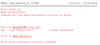
 
Environment: Mac M1 Chips, parallels Desktop simulator software, Windows 10 Insider Preview ARM version.

Error text:
Initializing MATLAB Runtime version 9.2
BLAS loading error:
refblas.dll: The specified module could not be found.
Segmentation failed...returning an empty tag
Switching to another virtual machine software that supports Windows 10 ARM did not encounter this issue, and the software usage problem was resolved.
 
The support helped and found a solution for the problem, that is as following:
Uninstall the "MATLAB Compiler Runtime 7.16 (32-bit)" on Windows 11 by going to 'Control Panel → Programs and Features'

Now everything is working flawlessly :)!
 
Back
Top