
MacBook Pro M5 Pro. MacOS 26.5.1
New install of activated Parallels 27.
Downloaded Windows 11 ARM from Microsoft server.
VM Configuration:
OS: Win11_25H2_English_Arm64_v2
CPU: 2
RAM 2GB
HDD: NOT SYNC with Mac SSD Space, default location: IDE0:0, (SATA0;1 same issue), HDD Size 64GB.
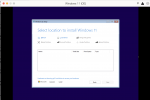
Windows cannot see the Storage device in order to install. I've clicked on the ToolBox install, but that only contains NETWORK drivers.
I have contacted Parallels support via Facebook messenger, but they did not understand my message. I am still waiting on supports reply.
How or where can I obtain the HDD drivers to install Windows OS using Parallels?
New install of activated Parallels 27.
Downloaded Windows 11 ARM from Microsoft server.
VM Configuration:
OS: Win11_25H2_English_Arm64_v2
CPU: 2
RAM 2GB
HDD: NOT SYNC with Mac SSD Space, default location: IDE0:0, (SATA0;1 same issue), HDD Size 64GB.
Windows cannot see the Storage device in order to install. I've clicked on the ToolBox install, but that only contains NETWORK drivers.
I have contacted Parallels support via Facebook messenger, but they did not understand my message. I am still waiting on supports reply.
How or where can I obtain the HDD drivers to install Windows OS using Parallels?
