Windows flickers in 'Single Window' mode

DFoxgrov

Bit poster
I have recently seen two instances of Windows flickering badly in Parallels for Mac 3.0. In both cases, the computers have been iMacs (one from 2006 with a Core Duo chip, the other from 2007, with a Core 2 Duo chip).

Here is the way another user has described the issue - see post at:
<http://forums.parallels.com/showthread.php?p=91483#post91483>

**********************
I've installed Windows XP Pro inside Parallels, and inside the Virtual Machine I'm getting pretty bad display quality. For example when I mouse over a window in XP, often it flickers on and off. Or when I close a window, often it flickers back and forth in and out for a number of minutes before disappearing entirely.

I've played with a couple of settings in Parallels. For example setting up specific custom resolutions, and matching those inside XP. I've also increased the amount of video memory assigned by Parallels to the virtual machine. The issue has been persistent and invariant under these changes.

***********************

I tried cloning the Core 2 Duo iMac to a MacBook Pro, and the problem does NOT happen on the portable.

I have replaced the RAM in the Core 2 Duo iMac and the problem continues with the new RAM.

I have followed the procedures for increasing the virtual RAM in Windows. It didn't help.

This is happening with Parallels Desktop 3.0 for Mac, build 5582.

The problem seems to go away if the systems are switched to Coherence.

Thanks for any help.
 
I'm having this same issue on a 2.33 Mac Book Core 2 Duo. It isn't a flicker so much as a the UI shifting between the previous and current state.
 
Hello,

Did you try reinstalling Parallels Tools?
Could you please let me know what screen refresh rate is set in your VM?
Check this in Control Panel - Display - Settings - Advanced - Monitor - Monitor settings.

Best regards,
Xenos
 
Thanks for your suggestion.

I reinstalled Parallels Tools. The problem remains.

The problem has also cropped up on another of our computers, an iMac Core 2 Duo running 10.4.11.

The refresh rate in the VM is set to 60 Hz. (That is the only choice in the pull-down menu.)

Thanks!
 
Hello DFoxgrov,

Could you please let me see the screenshot of Windows flickering?

I would also like to have a screenshot of the processes running in Windows when the issue comes up. Open Task Manager (right click menu bar at the bottom of the window), choose Processes tab and make a screenshot.

Send them attached to your next post.
Thank you in advance.

Best regards,
Xenos
 
Please note that these "Images" are actually
flickering on and off the screen very quickly.
It is difficult to capture the flavor of the problem
with static screenshots.

Here is a screenshot of the processes running.
(Please note that this list changes on the different c
omputers that we have that are experiencing this problem.)

processes.png


Here are two screenshots of the problem:

flickering.png


flickering2.png


Thanks!
 
Last edited:
Hello DFoxgrov,

Thank you very much for the screenshots!

Please try increasing your VM video memory size in Configuration Editor - Memory.

If this does not help, hide Parallels Desktop by clicking Hide in Parallels Desktop menu. Then restore Parallels Desktop by clicking the icon in the Mac OS bar.

Best regards,
Xenos
 
Hello, thanks for the suggestions.

I increased the VM video memory size to 48 MB. The problem showed itself again after a few minutes. In the VM, I was running Firefox and MS Word.

Then I hid Parallels Desktop and then restored it. The problem remained.

Thanks again!
 
Hello DFoxgrov,

Could you provide me with some additional information?

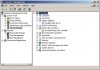
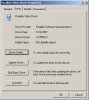
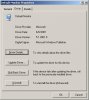
Please open Control Panel -> System -> Hardware -> Device Manager. In Device Manager box click on Monitors and Display Adapters to see the drivers. Open Parallels Video Driver and choose Driver tab.

I would like to see the screenshots of Device Manager box and Driver tab of Parallels Video Driver.

Thank you!

Best regards,
Xenos
 
Hello DFoxgrov,

Do you use ZENworks Remote Session Request Utility for User on Managed Device?
If so, we will test this utility to check if it is causing the issue.

Best regards,
Xenos
 
Hi Xenos,

Just wanted to let you know that I am having the same issue on a MacBook Pro 2.16GHz and have done all the trouble shooting steps you requested but do not have Novell ZENworks installed so I don't think it is related.

Regards,

Moradai
 
Hello Moradai,

Could you please send me the screenshots of Device Manager box and Driver tab of Parallels Video Driver as well?

Best regards,
Xenos
 
Screenshots you requested.

Hi Xenos,

Here you go. They look the same to me.

Thanks,

Moradai
 

Attachments

  • 1.JPG
    1.JPG
    54.4 KB · Views: 19
  • 2.JPG
    2.JPG
    31.5 KB · Views: 17
  • 3.JPG
    3.JPG
    29.9 KB · Views: 13
Seeing the same issue on 2 MacBook Pros now (older, Core Duo models)... On the first machine I'm not sure when it happened but i had problems from the start with no mouse control and getting Parallels Tools to update.

On the second machine, it seemed fine after installing Parallels tools and rebooting, but then it started happening again on a reboot after installing Symantec Anti-virus (though i doubt it's related). I'm using build 5582, going to try downgrading to an older version and see if it's worked around.
 
Hello,

Moradai and Blackcrayon, do you have DirectX Shaders (experimental) enabled on Video tab in Configuration Editor? If so, please disable them.

Best regards,
Xenos
 
Has there been any resolution to this? We are experiencing the same problems. This started happening after I upgraded the machine to 3.0 build 5582. Here is what I have tried...

- Rebooted (of course!)
- Uninstalled Parallels
- OSX updates (running all the latest and greatest)
- Reinstalled Parallels
- Different user account (both Windows and OSX)
- Recreated configuration file
- Upped video memory
- Windows updates
- Reinstalled Parallels tools
- Changed resolution
- Disk Utility repaired permissions
- Disk Utility verified disk
- Checked Windows processes
- Checked OSX processes

Now here's something I find weird. When you are booting up Windows and is at the black screen with the Windows logo, it DOES NOT flicker, or at least noticeably.

Here is my hardware information:

Model Name: iMac
Model Identifier: iMac5,1
Processor Name: Intel Core 2 Duo
Processor Speed: 2GHz
Number of Processors: 1
Total Number of Cores: 2
L2 Cache (per processor): 4MB
Memory: 2GB
Bus Speed: 667MHz
Boot ROM Version: IM51.0090.B09
SMC Version: 1.8f2

Graphics/Display

ATI Radeon X1600
Chipset Model: ATY,RadeonX1600
Type: Display
Bus: PCIe
PCIeLane Width: x16
VRAM (Total): 128MB
Vendor: ATI (0x1002)
Device ID: 0x71c5
Revision ID: 0x0000
ROM Revision: 113-xxxxxx-139
EFI Driver Version: 01.00.139
 
I'm also seeing severe guest OS flicker

Running 3.0.5548 on a recently upgraded VM. Host is 10.4.11 on MBP C2D. Re-installed parallels tools and otherwise followed advice above. Still getting massive flicker, guest os is unusable.

Trying other settings like turning off hardware accelleration and write combining in advanced panel of display settings.
 
Back
Top