Windows cannot access \\Mac\Home\Desktop

ShigeY1

Bit poster
I switched from MacBook Pro to iMac.
Both OS-X 10.13.6
Parallels 14 + Win7

then got following error.

Windows cannot access \\Mac\Home\Desktop
Erro Code: 0x800704b3

I searched for solution and found following sentence but I can't find that action menu.
"start the virtual machine. Select Actions (from the Mac menu bar) -> Reinstall Parallels Tool"

What can I do?
 
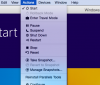
Hi, in order to find Actions menu, activate your VM and go on the top Mac menubar.
Please check the screenshot attached.
 

Attachments

  • Screen Shot 2019-04-15 at 17.37.05.png
    Screen Shot 2019-04-15 at 17.37.05.png
    79.7 KB · Views: 26
I too have the same problem but perhaps more. I have Parallels 14, and have successfully loaded Windows 10.1 and Quickbooks 2017 and then as well Windows XP and Quickbooks 2003 all of which were working. When I went to install Quicken 2007 it would not install and gave me the message Windows cannot access//Mac/Home/Documents I tried several solutions none worked and now when I try to save Quickbooks 2003 under Windows XP I get the message that access to //Mac/Home/Deskstop is not available. So in reading the forum I note the above post about "reinstall Parallels Tool" I wen to my Parallels program and found this is not an option when I open the top MAC Menu Bar. All other options are there but not that one. HELP,,,,,,
 
Back
Top