So I had the same black screen of death problem...but using the menu bar I shut the system down, then restarted it and all is good again...I'm in windows, have installed apps and am working.I installed it just fine and was able to surf the web vi MS Edge. I then installed Windows update and everything is frozen. I removed the VM and installed it again. Same issue. It boots up, but everything is frozen and I cannot do anything.

Install the app
How to install the app on iOS
Follow along with the video below to see how to install our site as a web app on your home screen.
Note: This feature may not be available in some browsers.
You are using an out of date browser. It may not display this or other websites correctly.
You should upgrade or use an alternative browser.
You should upgrade or use an alternative browser.
Windows ARM64 - seems to boot up
- Thread starter DanO3
- Start date
-
- Tags
- arm processors windows 10
I have currently updated to the latest build (21277) and for me the issues are still persistent, but as Chris said things mostly work fine, just some applications receive side by side errors or simply don't open such as microsoft store... otherwise for an early release it is very stable on windows ARM.
Yes Shaun, I have now upgraded to the latest build 21277, still seeing windows native apps not loading (this includes the Microsoft Store), Calendar, Mail, Calculator, Paint 3D, Maps load but no details are displayed. Overall still pleased with the initial progress of the build, looking forward to more updates.
I had that too, the first time around. would just cycle thru this again and again. I killed and deleted the vm image, started fresh, second time wit worked, and Windows boots up fine (but display doesnt refresh until in resize the window, as reported by me and someone else in two other threads).Mine crashes and boots to setup repair
Has anyone been able to get Microsoft Teams installed? I get a JavaScript error occurred in the main Process error, both on the Beta Win 10 arm release and the Developer. I've been able to install it on Win 10 virtualized with UTM.
Attachments
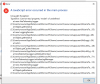
Got exactly the same problem.Has anyone been able to get Microsoft Teams installed? I get a JavaScript error occurred in the main Process error, both on the Beta Win 10 arm release and the Developer. I've been able to install it on Win 10 virtualized with UTM.
How did you update to 21277. I'm still on 20231 and Windows Update does not update me to 21277, says I'm up to date?After Upgrading to 21277 Windows Build I have also disabled Parallels Tools and am able to restart without issue.
Thank you!
CristianV4
Bit poster
i have the same issue. All working great and boots everytime with no problems. can pause the windows and all that. internet works on it on Edge and installed Mozilla as well and no issues but no apps other then Internet and Office want to open....anyone any idea?It booted up just once and couldn't run any app other than Office and Edge; other apps like the Microsoft Store just crashed on the splash screen. After doing a restart, nothing worked; just hung. Removed the VM, installed again, and same issue.
i have installed the Windows 10 Build 20231 from https://www.microsoft.com/en-us/software-download/windowsinsiderpreviewARM64
CristianV4
Bit poster
i have to mentioned that i selected Beta Channel out of the 3 options . not sure if that makes any difference.
also i can install apps from internet and can run them such as Steam, GOG (similar to steam) i even downloaded and installed games from Steam and palyed them flawlessly.
also i can install apps from internet and can run them such as Steam, GOG (similar to steam) i even downloaded and installed games from Steam and palyed them flawlessly.
Attachments
You won't be able to run x64 Intel apps unless you select dev channel and update to build 21277.not sure if that makes any difference.
LawrenceW1
Bit poster
I've got the same issue. Or rather, nothing appears to respond until I resize the window, then whatever I just clicked on pops up. It seems that the screen doesn't refresh properly. With every click I have to resize the window slightly to get it to show what I just did.Finally got it running, rebooted, and now I have the same issue. It's loading like it should work, but nothing responds.
CristianV4
Bit poster
i have created another partition and changed it to DEV channel but havent tested anything in there yet. Made some more research in Beta Channel and finally made Win Store to work and download certain apps and even after reboot all working good. it had something to do with Auto Updates which is swtiched Off and that worked.You won't be able to run x64 Intel apps unless you select dev channel and update to build 21277.
Yes everyone. It does not work. Check other posts here to see what you options are for a workaround.Anybody else having problems with the Microsoft App Store on Windows 10 Arm?
I just checked but somebody managed to make it work. Some hints needed, please!Yes everyone. It does not work. Check other posts here to see what you options are for a workaround.
Merry Christmas!
It seems like a lot of work to replace Arm32 stuff only for it to be replaced during the next OS update.The only way to make the store work is to replace it. See this thread (which should probably be pinned): https://forum.parallels.com/threads...s-store-calculator-etc-crashing-on-m1.351878/
It's probably worth remembering that this is a technology preview. It's not even mature enough to be a public beta. Lots of basic functionality not working yet. Also the version of Windows we're using is also and Insider Preview.
I personally didn't expect anything close to a "production ready" experience. I'm amazed it runs at all. Hopefully both Parallels and Microsoft will get some updates out soon, but I'm not expecting to use this as a "daily driver" for some time yet.
I personally didn't expect anything close to a "production ready" experience. I'm amazed it runs at all. Hopefully both Parallels and Microsoft will get some updates out soon, but I'm not expecting to use this as a "daily driver" for some time yet.
ChristopherG12
Bit poster
I've noted since the Christmas Eve update, my shared networking no longer stays connected reliably. Running the Windows troubleshooter can sometimes return it to functionality, but the networking will later fail again. Just since the latest update.