Windows 8.1 stutters, resolution does not fix itself

Damn, I have another problem that there wasn't before the update. When I resize the virtual machine window i can hear a noise inside my Mac (like a "clack"). This happens every time I resize the window. I'm worried about
It because it's a strange mechanical noise never heard before. Anybody with the same problem?
 
same problem.

Problem ID: 30675968

i suspect manual drive install is required for every1 who update.

please automating the process into new parallels updates.
 
Last edited:
same here
after uninstall para tools, can not start win8.1
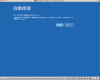
after the vm restarted itself 3 times, entered self auto repair mode and restarted.
 
patavinus,

How exactly Windows fails to start without tools? Does it show blue screen?
After all it's possible to update display driver manually. The downside is that if some other components of Parallels Tools are also misconfigured, you'll still need to reinstall.
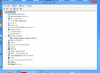
To update display driver right-click on Microsoft Basic display and select Update Driver Software... from the menu. Then press "Browse my computer for driver software", then "Let me pick from a list of device drivers on my computer", then "Have disk..." button. Click "Browse..." button and navigate to C:\Program Files <or Program Files (x86) for 64-bit Windows>\Parallels\Parallels Tools\Drivers\prl_dd, then double click prl_dd.inf file and click OK. Then click Next and confirm driver installation.

----------------------------------------------------------------------------------------
If para tools is uninstalled. the Win8.1 will not start. and yes, with Blue Screen.
it will keep restarting Non-Stop, saying in the state of auto-repairing.
-----------------------------------------------------------------------------

Screen Shot 2013-11-07 at 1.51.43 PM.png

-
 
patavinus,

How exactly Windows fails to start without tools? Does it show blue screen?
After all it's possible to update display driver manually. The downside is that if some other components of Parallels Tools are also misconfigured, you'll still need to reinstall.
To update display driver right-click on Microsoft Basic display and select Update Driver Software... from the menu. Then press "Browse my computer for driver software", then "Let me pick from a list of device drivers on my computer", then "Have disk..." button. Click "Browse..." button and navigate to C:\Program Files <or Program Files (x86) for 64-bit Windows>\Parallels\Parallels Tools\Drivers\prl_dd, then double click prl_dd.inf file and click OK. Then click Next and confirm driver installation.

------------------
or you can press Cmd+R, typing in "devmgmt.msc",

open drop-down in the display.

right-click Microsoft basic driver, select auto update.

it will update into parallels driver by itself.

Screen Shot 2013-11-07 at 2.39.03 PM.png

--
 
Back
Top