
Install the app
How to install the app on iOS
Follow along with the video below to see how to install our site as a web app on your home screen.
Note: This feature may not be available in some browsers.
You are using an out of date browser. It may not display this or other websites correctly.
You should upgrade or use an alternative browser.
You should upgrade or use an alternative browser.
Windows 11
- Thread starter ae6dx
- Start date
My MAC is iMAC 2019 with 3G Corei5 and Radeon Pro 570X. Parallels is 16. I tried to confirm if my iMAC can run Windows 11 by Windows Health Check today. The answer is "it doesn't meet the requirement". I think the problem comes from Direct X 12.0 driver. dxdiag says the driver model of Direct X is WDDM 1.2. Since Win11 needs WDDM 2.0, we need to wait update of Parallels for Win11.
I'm trying to make sure my VM is ready for Windows 11 but when I run PC Health it says my Windows doesn't have secure boot enabled. But I've followed the instructions elsewhere here (add "vm.efi.secureboot = 1" to the Boot flags under Advanced Settings) and then restart, and I still get the same error from PC Health. Anyone know how to fix this? 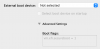
Hi!When the Windows 11 insider preview comes out can I install it in a new VM? How? So as to leave my working Windows 10 VM untouched.
There's a few things you can do. First would be to back up the Parallels VM's files and when you're done playing, copy them back and you'll be back to where you were.
Another way would be to take a Snapshot, upgrade to Win11, do your thing until you want to go back, then revert to your snapshot. (of course, anything new since Win11 wont be there...)
And the third and probably best way, because you can still work with both, is to set up a new instance of Win10, then do an upgrade on it.
And yes, the TPM requirement is not there for the insider builds, so you can upgrade to Win11 in a VM.
Ran across another thread which told me to add TPM support by opening my Hardware Configuration settings, clicking the + button at the bottom and adding the
TPM chip/module. Doing so automatically modifies the Boot Order setting in this same area by setting "Advanced Settings" Boot Flags: to vm.efi.secureboot = 1
Did this, restarted the VM and now the PC Health Check says my VM is ready for Windows 11.
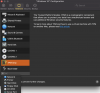
TPM chip/module. Doing so automatically modifies the Boot Order setting in this same area by setting "Advanced Settings" Boot Flags: to vm.efi.secureboot = 1
Did this, restarted the VM and now the PC Health Check says my VM is ready for Windows 11.
That worked a treat, Windows 11 Pro is running nicely in a Parallels VM on my M1 MacBook AirRan across another thread which told me to add TPM support by opening my Hardware Configuration settings, clicking the + button at the bottom and adding the
TPM chip/module. Doing so automatically modifies the Boot Order setting in this same area by setting "Advanced Settings" Boot Flags: to vm.efi.secureboot = 1
Did this, restarted the VM and now the PC Health Check says my VM is ready for Windows 11.
View attachment 17978

I don't either.. I have the latest version installed on my M1..I don't see the TPM add-on as an option on either the Intel or the M1 versions of Parallels 16 (standard, non-sub edition). I had no issue installing Win11 on my Intel Mac. It didn't even need modifying from a standard Win10 VM.
@JohnW66 What version of Parallels are you on? The subscription or the Pro version?
Bottom of this page: https://kb.parallels.com/en/122702