Windows 11 setup in wrong resolution, unable to proceed

준영D

Bit poster
https://forum.parallels.com/threads...n-error-on-password-reset.361356/#post-920027
I previously had the issue above, and was unable to figure anything out.
I decided to just refresh my desktop, booting into safe mode, and resetting while keeping my files.
Surprisingly my password started to work again, meaning the password not working was probably a windows or parallels bug (probably windows)

Anyways, now that the password works and seemingly everything was fine, I continued with the setup, and got stuck in the attachment step.
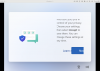
As you can see, the resolution got somehow messed up, and I am unable to continue. I press NEXT but it won't go on.
I'm guessing there's some kind of check box or toggle in the screen section that's getting clipped.

I tried Settings -> Hardware -> Graphics, and tried switching between the three options, but nothing changes
So I was wondering, is there anyway to change the resolution on this part of the screen?
 

Attachments

  • Screenshot 2023-09-28 at 1.00.43 PM.png
    Screenshot 2023-09-28 at 1.00.43 PM.png
    882.1 KB · Views: 28
https://forum.parallels.com/threads...n-error-on-password-reset.361356/#post-920027
I previously had the issue above, and was unable to figure anything out.
I decided to just refresh my desktop, booting into safe mode, and resetting while keeping my files.
Surprisingly my password started to work again, meaning the password not working was probably a windows or parallels bug (probably windows)

Anyways, now that the password works and seemingly everything was fine, I continued with the setup, and got stuck in the attachment step.
As you can see, the resolution got somehow messed up, and I am unable to continue. I press NEXT but it won't go on.
I'm guessing there's some kind of check box or toggle in the screen section that's getting clipped.

I tried Settings -> Hardware -> Graphics, and tried switching between the three options, but nothing changes
So I was wondering, is there anyway to change the resolution on this part of the screen?
Hello!
I advise you to install a new Windows virtual machine the way outlined in KB https://kb.parallels.com/125375:
Run Parallels Desktop, then click on the Parallels icon in the Mac menu bar > Control Center > + > Get Windows 11 from Microsoft > Continue > Install Windows.
 
Hello!
I advise you to install a new Windows virtual machine the way outlined in KB https://kb.parallels.com/125375:
Run Parallels Desktop, then click on the Parallels icon in the Mac menu bar > Control Center > + > Get Windows 11 from Microsoft > Continue > Install Windows.
Yeah... what a reply... you mess up one virtual machine, make another... well played Mikhail Ushakov, well played Parallels.

Due to the lack of testing and solving issues on Parallels as a product, users cannot put Windows 11 to factory settings on the same virtual machine to solve problems and to keep users data on the same place where they left them?

I ran into the same shitty outcome. There is no chance to change resolution while in instalation process. And there are my data on that virtual machine worth lot of money, because it's my work horse... And to be honest... i'm paying for this experience to your company... This results into absolutely no trust in your programming skills as a Parallels company.

Do something about this issue right now! I can wait a day or two for you to send an update on Parrallels to solve this. Otherwise, Im quitting your services and I'm switching back to windows machines.
 
Hello!
I advise you to install a new Windows virtual machine the way outlined in KB https://kb.parallels.com/125375:
Run Parallels Desktop, then click on the Parallels icon in the Mac menu bar > Control Center > + > Get Windows 11 from Microsoft > Continue > Install Windows.

To be honest, if there was a "reinstalation button" in the control center or configuration menu everything will be user friendly for this kind of situations, when you need to reinstall windows.

Every Windows User knows, there are times, you need to reinstall the system. Please make it possible! Make it now!
 
https://forum.parallels.com/threads...n-error-on-password-reset.361356/#post-920027
I previously had the issue above, and was unable to figure anything out.
I decided to just refresh my desktop, booting into safe mode, and resetting while keeping my files.
Surprisingly my password started to work again, meaning the password not working was probably a windows or parallels bug (probably windows)

Anyways, now that the password works and seemingly everything was fine, I continued with the setup, and got stuck in the attachment step.
As you can see, the resolution got somehow messed up, and I am unable to continue. I press NEXT but it won't go on.
I'm guessing there's some kind of check box or toggle in the screen section that's getting clipped.

I tried Settings -> Hardware -> Graphics, and tried switching between the three options, but nothing changes
So I was wondering, is there anyway to change the resolution on this part of the screen?
Did you resolve this issue as i have this issue today
 
Any solutions to this? The same problem here...
I also encounter the same problem.
I can solve this by patiently press enter on the "Next" button. Need to keep pressing still it scroll down to the end (around 3 minutes). The problem is because Parralles Tool not yet install so Windows dont have the correct display driver to use the correct resolution.
 
Wow... This posting helped solve the same issue I was having re-installing Windows 11 ARM under Parallels... Unreal, it was really. about 3 minutes of clicking "Next" to get to the point where I could re-install the toolbox app. Absolutely ridiculous.
 
Finally fixed my mouse cursor issue which has been a problem on the forums for years, and now onto this one which seems to have been around a while. Come on support, why do we pay to upgrade every version if you are not going to fix the issues that are common. I feel sorry for anyone who hasn't been able to fix these things issues.
 
Back
Top