Windows 11 on Arm

FWIW, here's the situation on my M1:
- never left Dev channel actively. I never ever did anything in the Insider section.
- Using latest Parallels 17 version
- Current version: 22000.184
- Might be important: I did register Windows with my Windows 10 Pro key (used to have windows 10 pro insider in the beginning)
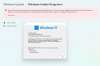
- On the Insider page in Windows Updates, I have been "kicked out, but in a positive way" of the Insider Program. I get no incompatibility messages anymore. My installation looks as if it were a Windows 11 Final Release, or Final Preview on a computer that meets all criteria.
I have read that 22000.x will be the final version for the release of Windows 11, and that is also the version that is curently in the beta and preview release channels.
22454 is currently in the Dev channel and this is NOT the version that will be released in october, this is a version that will later become an update to windows 11, as I understand it.
Basically, it seems to me that the risk is that at some point users get a warning that M1 is not supported and that they will no longer receive updates, leaving the VM at the risk of malware attacks. My plan is that if everything fails, I will have to get a Matebook X which is also fanless and reasonably similar to the Macbook --- and I will be really mad at MS....
 
FWIW, here's the situation on my M1:
- never left Dev channel actively. I never ever did anything in the Insider section.
- Using latest Parallels 17 version
- Current version: 22000.184
- Might be important: I did register Windows with my Windows 10 Pro key (used to have windows 10 pro insider in the beginning)
- On the Insider page in Windows Updates, I have been "kicked out, but in a positive way" of the Insider Program. I get no incompatibility messages anymore. My installation looks as if it were a Windows 11 Final Release, or Final Preview on a computer that meets all criteria.
I have read that 22000.x will be the final version for the release of Windows 11, and that is also the version that is curently in the beta and preview release channels.
22454 is currently in the Dev channel and this is NOT the version that will be released in october, this is a version that will later become an update to windows 11, as I understand it.
Basically, it seems to me that the risk is that at some point users get a warning that M1 is not supported and that they will no longer receive updates, leaving the VM at the risk of malware attacks. My plan is that if everything fails, I will have to get a Matebook X which is also fanless and reasonably similar to the Macbook --- and I will be really mad at MS....
In etwa ist bei mir die gleiche Situation wie bei Ihnen, nur dass ich noch Parallels 16.5.1 habe und Windows bei mir nicht aktiviert ist, da ich nur eine Windows 10 Home-Lizenz habe. Daher glaube ich nicht, dass zumindest zur Zeit ein Pro-Schlüssel von Bedeutung ist.
 

Attachments

  • Screenshot 2021-09-10 142515.png
    Screenshot 2021-09-10 142515.png
    267.7 KB · Views: 20
Dev build 22458 seems to insist on having TPM chip enabled.
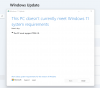
I have been using 17.0.1 on Dev channel without TPM enabled, with no problems until today. Build 22458 update today reported that 'This PC does not meet requirements' (screenshot attached) and aborted the update. I enabled TPM in settings, tried again, used the "Fix issues" button and downloaded and installed.
Actually I realise I did not try the "Fix issues" button before enabling TPM which was an option. When I saw the screenshot I went straight to enabling TPM. Maybe someone else can try "Fix Issues" without enabling TPM.
Screenshot 2021-09-16 at 11.06.53.png
 
Actually I realise I did not try the "Fix issues" button before enabling TPM which was an option. When I saw the screenshot I went straight to enabling TPM. Maybe someone else can try "Fix Issues" without enabling TPM.
However after turning on TPM I did not get the screenshot so I think turning it on was crucial in being able to apply the update.
 
That seems likely. The big question is whether MS moves away from their current rules for running Windows 11 in a VM or if the TPM requirement was a mistake in this build. At least the update didn't fail because of an unsupported CPU.
I'm guessing they will spoof a virtual Qualcomm CPU when they are able to negotiate that with MS.
 
Well, MS is indeed moving away from their previous rules for VMs with the newest Beta build (22000.194) . "This build includes a change that aligns the enforcement of the Windows 11 system requirements on Virtual Machines (VMs) to be the same as it is for physical PCs. Previously created VMs running Insider Preview builds may not update to the latest preview builds. In Hyper-V, VMs need to be created as a Generation 2 VM. Running Windows 11 in VMs in other virtualization products from vendors such as VMware and Oracle will continue to work as long as the hardware requirements are met. For more details on the Windows 11 system requirements - see this blog post here." https://blogs.windows.com/windows-i...g-windows-11-insider-preview-build-22000-194/

Thanks for that, I haven't seen (or really looked for) a similar article about the Dev channel but my experience with build 22458 looks like the same change, as would be expected.
 
I just wanted to say that a day or so after a fresh install of the new Windows 11 ARM file now available on the insider preview website, I have not had any incompatibility message, warning or error in the settings. Activation was smooth and windows update works fine. I haven't yet added the TPM chip to the Parallels control panel (though I think this is only required for Windows Hello or fingerprint scanning etc.) It allows me to enter any of the Windows Insider channels too, but I have left as is for now just to see how it runs.
 
Dev build 22458 seems to insist on having TPM chip enabled.
I have been using 17.0.1 on Dev channel without TPM enabled, with no problems until today. Build 22458 update today reported that 'This PC does not meet requirements' (screenshot attached) and aborted the update. I enabled TPM in settings, tried again, used the "Fix issues" button and downloaded and installed.
Actually I realise I did not try the "Fix issues" button before enabling TPM which was an option. When I saw the screenshot I went straight to enabling TPM. Maybe someone else can try "Fix Issues" without enabling TPM.
View attachment 18358
I tried the fix issue first, no result. Only option was to turn on TPM.
 
So as I understand from a few articles I've read.. MSFT has no plans on supporting virtualization of Windows 11 on arm platform. Since I've been unable to find a copy of Windows 10 arm64 and Udump images don't seem to work I'm in the dev channel using the latest build. Haven't found a way to change channels to beta or release and as already mentioned I don't have a Win10 image. Given their lack of support what happens once the preview expires (don't recall the date)? I realize there are several other OS that run in parallel desktop, but I'd like to be able to run Windows VM.
 
So as I understand from a few articles I've read.. MSFT has no plans on supporting virtualization of Windows 11 on arm platform. Since I've been unable to find a copy of Windows 10 arm64 and Udump images don't seem to work I'm in the dev channel using the latest build. Haven't found a way to change channels to beta or release and as already mentioned I don't have a Win10 image. Given their lack of support what happens once the preview expires (don't recall the date)? I realize there are several other OS that run in parallel desktop, but I'd like to be able to run Windows VM.
You can mount release Windows 11 iso right into your dev build and run setup. You cannot transfer app settings, but you can make a clean install.
 
You can mount release Windows 11 iso right into your dev build and run setup. You cannot transfer app settings, but you can make a clean install.
Isn't the release ver of W11 iso only 64bit. How can that be installed in an Arm environment (dev build)? Just curious. Thanks
 
(I didn't read everything here, and don't understand everything, but since I have Win 11 release version 22000 installed on parallels, I am wondering if not Parallels (the company) could simply provide a VM with that installed and then you simply add your Win key and use it. Sorry if I am completely mistaken here).
 
Have you found a way to download the ARM version of Windows 11? I could only find an iso for the Intel version.
The download page says to use the Assistant for ARM, but that produced an Intel as well. Then mounting and running setup, the installation almost begins then says "Windows 11 installation has failed"
 
Im currently on 22000.194 working fine. MS website has Win 11 22454 insider preview for ARM still. Is that the unstable version?
 
Installed and now running 22000.194. The about screen no longer says preview and no more build info on the lower side of desktop. . Running well at the moment
 
Isn't the release ver of W11 iso only 64bit. How can that be installed in an Arm environment (dev build)? Just curious. Thanks
Arm .iso build 22000.160 can be downloaded from uupdump. It will upgrade itself to release .194.
Windows allows to run setup for older builds directly from more recent ones, but it will be clean reinstall. So you can run setup from 22000.160 even inside last dev build 22458
 
Back
Top