Any details on what was selected when you did the Disk Cleanup? I tried at Full cleanup including system files, restarted, and I'm still getting the TPM 2.0 error.Had the same error, did a full Disk Cleanup and restarted, and now it's installing

Install the app
How to install the app on iOS
Follow along with the video below to see how to install our site as a web app on your home screen.
Note: This feature may not be available in some browsers.
You are using an out of date browser. It may not display this or other websites correctly.
You should upgrade or use an alternative browser.
You should upgrade or use an alternative browser.
Windows 11 on Arm
- Thread starter kundanno
- Start date
AndreasN10
Bit poster
For me the same.Windows 11 update was available to me this morning. I was surprised as when I checked the day before under the Windows Insider settings it said my system did not meet the minimum standard for Windows 11. Well anyway I pressed the install button this morning (after I created a backup image), and the install worked perfectly. Parallels tools installed fine, reboots were quick, system seems snappy and responsive. Coherence works well (moved task bar to left and shrunk dock). Office 365 opens, store opens etc. A lot better experience when compared to the 6 months ago when the M1 was first introduced.
Installed Windows 11 with a big surprise. And even I have "only" a mac book Air the M1 chip makes a great job. superfast startup, speedy start of programms and apps, performance in general.
ChristopherW23
Junior Member
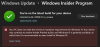
This is the same for me, Microsoft needs to sort it out, obviously its working fine.It's installed, but Microsoft isn't happy about it:
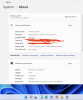
I'm running windows 11 on M1 iMac, but this was totally by accident. I had auto updates and restarted my machine after what I thought was Win 10 update. It seems to be running but have did any performance test yet. They made the windows bar like the Mac Doc.
Attachments
ConnectixSoldOut
Member
Yeah installed 11 (aka 10 SP2) last night. Seems to be fine for me too.
TPM will be a problem on release.. since it's required, but I suspect Parallels will address that before release. It'd be nice if MS allows people to buy 11 for Arm this time around.. guess we'll see.
TPM will be a problem on release.. since it's required, but I suspect Parallels will address that before release. It'd be nice if MS allows people to buy 11 for Arm this time around.. guess we'll see.
Same situation here. With Windows 11 there are several performance issues. Had to restore an image prior to Windows updateI'm running windows 11 on M1 iMac, but this was totally by accident. I had auto updates and restarted my machine after what I thought was Win 10 update. It seems to be running but have did any performance test yet. They made the windows bar like the Mac Doc.
I have made a video tutorial for installing Windows 11 ARM, which includes a workaround for the TPM 2.0 issue:
Thank you !
I have been able to install Windows 11 arm64 in Parallels on my M1 MacBook Pro 11. This thing is FAST! If you care to know how to do it then here, you go. It was easy. This will give you a bare metal install right from an iso. Can't get a cleaner install than this ;-)
This solution is derived from (588) Windows 11 ARM is FINALLY HERE! M1 Mac Install Tutorial - Parallels VM + Game Benchmark Comparison - YouTube
- Using uupdump.net create the two amr64 iso (win10 and win11)
- Mount win11 iso
- Mount win10 iso
- Copy the win10 iso files to a new folder
- Replace the win10 iso files /sources/install.wim with /sources/install.wim from the win11 iso
- Create new iso from combined files in new folder:
.\bin\cdimage.exe -bootdata:1#pEF,e,b"D:\iso\win11arm64\efi\microsoft\boot\efisys.bin" -o -m -u2 -udfver102 D:\iso\win11arm64 win11arm64.iso
- Use to install win11 on parallels for m10
This solution is derived from (588) Windows 11 ARM is FINALLY HERE! M1 Mac Install Tutorial - Parallels VM + Game Benchmark Comparison - YouTube
- Using uupdump.net create the two amr64 iso (win10 and win11)
- Mount win11 iso
- Mount win10 iso
- Copy the win10 iso files to a new folder
- Replace the win10 iso files /sources/install.wim with /sources/install.wim from the win11 iso
- Create new iso from combined files in new folder:
.\bin\cdimage.exe -bootdata:1#pEF,e,b"D:\iso\win11arm64\efi\microsoft\boot\efisys.bin" -o -m -u2 -udfver102 D:\iso\win11arm64 win11arm64.iso
- Use to install win11 on parallels for m10
Windows 11 for Mac in the works, Parallels confirms
https://www.imore.com/windows-11-mac-works-parallels-confirms
"Since Windows 11 has just been announced recently, the Parallels Engineering team is waiting for the official Windows 11 Insider Preview build to start studying changes introduced in the new OS to deliver full compatibility in future Parallels Desktop updates," Nick Dobrovolskiy, SVP of Engineering and Support told iMore. Microsoft's first Insider preview build came out on Monday, but the rollout was a bumpy one and it doesn't include all of the new features that are coming to Windows 11 later this year such as Microsoft Teams integration or support for Android apps.
The company did not go beyond "future Parallels Desktop updates" in terms of a timeframe, but added, "we will surely do everything that's possible to make it happen." Parallels' current version for macOS, Parallels Desktop 16 is optimized for macOS Big Sur, and the company has publicly stated that it is testing Parallels on the macOS Monterey Beta "to ensure full compatibility as soon as it is released."
https://www.imore.com/windows-11-mac-works-parallels-confirms
"Since Windows 11 has just been announced recently, the Parallels Engineering team is waiting for the official Windows 11 Insider Preview build to start studying changes introduced in the new OS to deliver full compatibility in future Parallels Desktop updates," Nick Dobrovolskiy, SVP of Engineering and Support told iMore. Microsoft's first Insider preview build came out on Monday, but the rollout was a bumpy one and it doesn't include all of the new features that are coming to Windows 11 later this year such as Microsoft Teams integration or support for Android apps.
The company did not go beyond "future Parallels Desktop updates" in terms of a timeframe, but added, "we will surely do everything that's possible to make it happen." Parallels' current version for macOS, Parallels Desktop 16 is optimized for macOS Big Sur, and the company has publicly stated that it is testing Parallels on the macOS Monterey Beta "to ensure full compatibility as soon as it is released."
Evening everyone...just curious...has anyone tried this yet to bypass the TPM check?
https://www.bleepingcomputer.com/news/microsoft/how-to-bypass-the-windows-11-tpm-20-requirement/
https://www.bleepingcomputer.com/news/microsoft/how-to-bypass-the-windows-11-tpm-20-requirement/
martinlatino
Bit poster
You can install Windows 10 ARM64 in your virtual machine and it will update automatically to Windows 11 Insider Build.Any rumors on an early access version of Windows 11 on Arm? I know I am getting ahead of myself here...but curious minds want to know
ZeroCoolSpain
Junior Member
Actually, it will attempt to install Windows 11 but stops because it wants you to Fix your PC, which ultimately means it can't find TPM 2.0. I've left my M1 MBA as is and hopefully it will continue to work with the last updated version of Windows 10. It would have been nice if it updated enough to push out the printspooler fix, maybe it did maybe it didn't.You can install Windows 10 ARM64 in your virtual machine and it will update automatically to Windows 11 Insider Build.
ZeroCoolSpain
Junior Member
Hi,
Fix is more simple. I have Win11 ARM works correctly in Parallels 16.5. MacBook Pro M1
Steps:
1- Create ISO in UUPDump
2- Extract ISO content in your hard disk
3- Replace in source folder appraiserres.dll files
4- Run setup.exe
1- ** Windows 11 ARM ISO
4- ** To install over Win10 ARM
ZeroCoolSpain
Junior Member
You have to create Win 11 ISO in the same language as the original Win 10 that you have to keep the applications. If it is another language, it deletes the applications (it indicates during installation)1- ** Windows 11 ARM ISO
4- ** To install over Win10 ARM
I tried dong the things others mentioned then went backwards in the forum and found all I had to do was restart Windows and do the update again. This time it said it needed to fix some things so I went ahead and let it do its thing for a few minutes, then it continued to download and install Windows 11 ARM. It took about 20 minutes or so, restarted, Parallels installed their tools so restarted again and it's now running.Actually, it will attempt to install Windows 11 but stops because it wants you to Fix your PC, which ultimately means it can't find TPM 2.0. I've left my M1 MBA as is and hopefully it will continue to work with the last updated version of Windows 10. It would have been nice if it updated enough to push out the printspooler fix, maybe it did maybe it didn't.
Wow!! My ex-father-in-law is going to hate it but I don't think it will run on his PC anyway. The GUI looks much closer to a Mac with the dock, which means everything is somewhere different. A 94 year old will not be happy with these changes and I bet a lot of regular Windows users won't be happy either. Either way, it's running and not worrying about TPM, unless---- Parallels pushed out a fix or Microsoft made some changes to not worry about TPM right now during the preview. It's now running more regular updates.