Windows 11 ARM, trouble installing HP printer driver

JonathanK13

Bit poster
Hey all, I've been having trouble getting a specific printer working on my windows 11 VM. The goal is to have multiple versions of the same printer, an HP P4014, each set up with its own tray when selecting which printer to print from (tray two for one type of paper, tray 3 for another, ect). The problem we are running into is upon installing the appropriate Windows 11 64-bit driver, we get the error message operation could not be completed error 0X800f0214 the specified path does not contain any applicable device infs. Our next idea was to install the printer driver for the Mac OS and share it through parallels with the appropriate tray configurations, but there is no Mac OS driver for the P4014. Finally we tried installing the HP Smart Helper tool, which does install the printer on the Mac OS (does not appear as an option through the VM though) but ultimately gives no options to configure which tray to draw from. Is there a way to fix this initial Windows 11 VM driver issue, and if not, a workaround that can get us to have multiple versions of the same printer each configured with its own paper source settings?
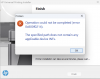
 

Attachments

  • Screenshot 2023-02-07 at 12.43.53 PM.png
    Screenshot 2023-02-07 at 12.43.53 PM.png
    157.4 KB · Views: 21
same here - it was working until a couple of days ago. I tried re-installing the printer software & now getting 0X800f0214 error.
Does anyone have any pointers?
This is Windows 11 Pro Insider Preview running in parallels 19 on MacoS 14.2.1 M1 chip
 
same here - it was working until a couple of days ago. I tried re-installing the printer software & now getting 0X800f0214 error.
Does anyone have any pointers?
This is Windows 11 Pro Insider Preview running in parallels 19 on MacoS 14.2.1 M1 chip
Hello,
Thank you for your feedback

Try to disable Windows firewall and uninstall your antivirus.

Once done, retry the printing software.

Let us know if this helped.

thanks
 
I have the same problem, i installed parallel desktop and using windows 11 there but when i am installing software in which sdi driver package is included so it shows an error message 0X800f0214 error. anyone has a solution.
 
Error 0x800f0214 When Installing SDI Drivers on Windows 11 ARM in Parallels Desktop on M2 Mac
Hey everyone,

I'm having trouble installing SDI drivers on my Windows 11 ARM setup, which is running on a MacBook with an M2 chip through Parallels Desktop. Every time I try, I get this error message:

"Operation could not be completed (error 0x800f0214). The specified path does not contain any applicable device INFs."

I've double-checked the compatibility of the drivers, but I can't seem to get past this error. Has anyone experienced this before or have any advice on how to fix it?

Thanks in advance!

Windows11ARM #ParallelsDesktop #MacBookM2 #SDIDrivers #TechSupport #Error0x800f0214
 
Back
Top