ParallelsU860
Bit poster
Hej, I have problems installing Epson Print Drivers or Virtual Port Drivers for an Epson POS (Point of Sale) Thermal Printer Model TM-T88VIwith Network Connection (Ethernet) on Apple iMac 24" M1 with the latest version of Parallels Desktop an Windows 11 ARM.
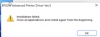
In the case "EPSON Advanced Printer Driver for TM-T88VI Ver.5.13E" every time I try to install the drivers it stops installation after 30sec and is ending the process with dialog "Installation failed"
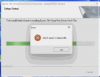
In the second case i tried only to install the "TM Virtual Port Driver Ver.8.70a" - this stops also with "Error: Can´t open \\.\EpsonPA
Both Installers can be found here under "Windows Printer Driver" or "Virtual Port Driver":
https://download.epson-biz.com/modules/pos/index.php?page=prod&pcat=3&pid=4983
Maybe someone have also experience the installation problem and allready found a solution for this.
Thanks!
In the case "EPSON Advanced Printer Driver for TM-T88VI Ver.5.13E" every time I try to install the drivers it stops installation after 30sec and is ending the process with dialog "Installation failed"
In the second case i tried only to install the "TM Virtual Port Driver Ver.8.70a" - this stops also with "Error: Can´t open \\.\EpsonPA
Both Installers can be found here under "Windows Printer Driver" or "Virtual Port Driver":
https://download.epson-biz.com/modules/pos/index.php?page=prod&pcat=3&pid=4983
Maybe someone have also experience the installation problem and allready found a solution for this.
Thanks!