Windows 10: Train Sim World crashing!

pemoz

Member
Hello everyone,

Last summer I bought and tried to run "Train Sim World" (Steam, DirectX10) on Parallels 13, but it crashed as soon a locomotive would be displayed.
Just recently I've updated to Parallels 14 hoping it would work now.
I've chosen "Games only" in the VM settings, put the VM Graphics to Auto (Recommended), the Resolution to Scaled (I've also tired Best for Retina display)
and I've put Train Sim World's graphics settings to low, but it still crashed.
Do you have any idea what I can do to make it work?

Many thanks!
 
Hi, did you check the "Train Sim World" system requirements?
Also did it crash with any error message?
Hi, thank you for your reply!

These are Train Sim World's system requirements:
  • OS: 64-bit Windows 7 Service Pack 1, Windows 8 / 8.1 or Windows 10
  • Processor: Intel Core i5-4690 @ 3.5 GHz or AMD Ryzen 5 1500X @ 3.7 GHz
  • Memory: 8 GB RAM
  • Graphics: NVIDIA GeForce GTX 750 Ti or AMD Radeon R9 270 with 2 GB VRAM or more
  • DirectX: Version 10
  • Network: Broadband Internet connection
  • Storage: 20 GB available space
  • Sound Card: DirectX Compatible
  • Additional Notes: Requires mouse and keyboard or Xbox Controller
And this is my Mac's system info.
  • OS: macOS Sierra v10.12.6
  • Processor: 3.3 GHz Intel Core i5
  • Memory: 24 GB
  • Graphics: AMD Radeon R9 M395 2048 MB
Also for the rest, DX10 is supported by Parallels (and was chosen), so that shouldn't be a problem, and the rest is also true (Internet connection, 20 GB space, etc.)
And yes, it did crash with an error message (see below).

Screen Shot 2019-03-01 at 09.20.18.png

I hope this helps!

Thank you!
 
Thanks a lot for the provided info, could you please locate this file C:\Program Files (x86)\Steam\steamapps\common\Train Sim World\WindowsNoEditor\Engine\Binaries\ThirdParty\Steamworks\Steamv139\Win64\steam_api64.dll ?
 
Thanks a lot for the provided info, could you please locate this file C:\Program Files (x86)\Steam\steamapps\common\Train Sim World\WindowsNoEditor\Engine\Binaries\ThirdParty\Steamworks\Steamv139\Win64\steam_api64.dll ?
You're welcome!
I've located the file, what now?
Thanks in advance!
 
Ok @pemoz , then please create a snapshot (before make any changes, just to be sure, that you will be able to return back to the snapshot).
And then, please remove located file: C:\Program Files (x86)\Steam\steamapps\common\Train Sim World\WindowsNoEditor\Engine\Binaries\ThirdParty\Steamworks\Steamv139\Win64\steam_api64.dll

I've found this workaround, but cannot test it on my side unfortunately.
So, first, take a snapshot (Actions-> Take snapshot ), then remove file, check the issue, and if this issue still persists -> go to actions and choose"revert to snapshot" (Note, if you have several snapshots, please choose the "manage snapshot" -> and then click on the latest one. )
Let me know the results as usual, please.
 
Ok @pemoz , then please create a snapshot (before make any changes, just to be sure, that you will be able to return back to the snapshot).
And then, please remove located file: C:\Program Files (x86)\Steam\steamapps\common\Train Sim World\WindowsNoEditor\Engine\Binaries\ThirdParty\Steamworks\Steamv139\Win64\steam_api64.dll

I've found this workaround, but cannot test it on my side unfortunately.
So, first, take a snapshot (Actions-> Take snapshot ), then remove file, check the issue, and if this issue still persists -> go to actions and choose"revert to snapshot" (Note, if you have several snapshots, please choose the "manage snapshot" -> and then click on the latest one. )
Let me know the results as usual, please.
Hi!
I've just tried that, but it still crashed.

Before I reverted back, I tried going into the map on foot, (somewhere along the line, as to not render any locomotives) and that actually worked.
I could walk around all I wanted, though the ground textures looked very broken:
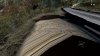
glitchtextures.jpg

When I turned the camera, the texture sort of flickered between broken and not broken.
The rest of the ground's still black, though:

workingtexture.jpg

While I was downsizing these images in macOS, Parallels and Train Sim World was still running. I heard a locomotive getting nearer,
so I quickly switched back to Windows 10, and, for the first time, it actually rendered a train (for about 3 seconds, before crashing again).

I then reverted back to the original Train Sim World snapshot (with that file still existent),
and tried the same thing again, to see if it had anything to do with me deleting that file.
Turns out the file changed nothing, without the file it works exactly the same way as with. I just hadn't tried spawning on foot before.
I've walked around for quite a while (with the file), about 20 minutes I'd say, and it didn't even lag.
The ground was black, and some textures flickered between really stretchy and broken and not broken, but it did work.
Then, when I arrived at the Coal Mine, there was a stationary train about 50m in front of me. I walked towards it, and when I was about 10m away, it crashed again.

Please, what I should try next?

Thank you!
 

Attachments

  • nightroad.jpg
    nightroad.jpg
    93.5 KB · Views: 3
Ok, could you please try the following:
Go to "(My) Documents" and then "My Games". Delete the TS2Prototype file located there.
(And also take a snapshot before removing)
I've found several customers with the same issue on the real PC. So, please try the suggestion above and I'll keep looking for the solution
 
Thanks for your answer!
I've tried this, but it still doesn't work.
Do you have any other idea what I could try next?
Thank you!
 
Hi, We've escalated this issue to the Parallels Engineering team and they are currently working on the resolution. Once we get any updates we will contact you immediately.
 
Back
Top