Hello,
I have the following setup:
Regards,
Shunta
I have the following setup:
- MacBook Air (M1, 2020)
- macOS Big Sur Beta 11.4
- Screen resolution is set to 2048 x 1280 using the Display Menu utility
- Parallels Desktop 16 for Mac Pro Edition Version 16.5.0
- Parallels VM - Windows 10 Insider Preview ARM64 (21376.1)
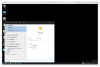
- While not in the Coherence mode, typing to search in the Windows Start Menu works as expected (1.png)
- While in the Coherence mode, clicking on the virtual machine icon in Dock opens the Start Menu correctly (2.png)
- But once I start typing to search, the result is misaligned (3.png)
- After this happens, typing to search no longer works even out of the Coherence mode (4.png)
- Once SearchUI.exe is terminated, typing to search resumes working while not in the Coherence Mode
Regards,
Shunta