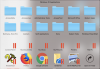
After updating my iMac from Sierra to Mojave, the Windows 10 Applications icons (Control Panel, My Documents, My Music, etc.) disappeared from the dock menu in macOS. In their place, all I see are the Parallels overlay. How can I fix this?
--
Michael
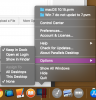
Hi from either launchpad or finder>applications>Parallels Desktop>open desktop the icon should then appear in your mac dock <to make it a part of your dock click the icon>Options>Keep in Dock
That is not the issues. The folder icon "Windows 10 Applications" already appears in the dock. But when you click on it, many of the Windows 10 icons do not display. Only the Parallels overlays (the two red vertical lines) appear where the icons should be. I have tried removing "Windows 10" in the Control Center, and then re-opening the PVM file, but menu still populates with the missing icons.
Sorry about that MichaelR29, I so totally read your post the wrong way. Since your update of your mac OS have you updated Parallels tools? Also are you in Coherence mode? If you are what happens when you exit Coherence mode, then close down the vm properly, These knowledge base instructions should help to rebuilt your start menu . Please remember NOT to delete any Mac OS Folders.
Yes, kat, Parallel Tools updated itself automatically after I upgraded to Mojave. I usually work in Coherence mode, but this issue occurs regardless of what mode I'm currently in. I followed the instructions on that link, but the rebuilt "Windows 10 Applications" menu still lacks many Windows 10 icons.
Hmmm. Now that you mention it, I also upgraded my Windows 10 installation immediately after upgrading to macOS Mojave. So apparently it's a Windows 10 1903 (May update) issue.