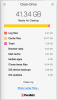
I have a select "Cache files" that indicates 39.71 GB of space reclaimable. That's quite a bit, and I'd like to know exactly what this program is trying to jettison. It's not OK to just say ... "Oh, it's fine, you don't need those files!" WTH? How do I know if I need them if I have absolutely ZERO clues as to what they are! C'mon parallels. For an otherwise fantastic product, the lack of this feature is like a big "shove off" to your users! If I can reclaim that kind of space, that's great, but I'm not gonna delete nearly 40 GB just because some "Dumb App" tells me to. Give us an advanced option, or something, so we can see those files.

What are the "Cache files" in the Clean Drive cleanup?
- Thread starter BenN4
- Start date
-
- Tags
- cache clean drive cleanup