
Install the app
How to install the app on iOS
Follow along with the video below to see how to install our site as a web app on your home screen.
Note: This feature may not be available in some browsers.
You are using an out of date browser. It may not display this or other websites correctly.
You should upgrade or use an alternative browser.
You should upgrade or use an alternative browser.
VM is not recognized as supported system
- Thread starter StephanS2
- Start date
-
- Tags
- fanuc roboguide win 10 windows 10

Maria@Parallels
Problem solver
Hi, did you get any error messages?When I try to install Roboguide (FANUC) on my virtual WIN 10 Machine Roboguide says System is not supported although Roboguide supports WIN 10. Does anyone know how to make Roboguide think it sees a real hardware machine?
And did you use the correct version, I mean 32/64 bits?
Hi,
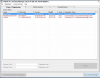
Yes from the License Manager I get the Errormessage: Error= Corrupted(107) Unsupported Operating System. I have installed a WIN 10 32-bit Version and Roboguide Installation should work on this. But normally there are Problems with virtual Machines. I thought only with virtual machines running on Windows, but it seems that there are the same Problems with virtual PCs running with Parallels on a MacBook. Do You have any solution?
Yes from the License Manager I get the Errormessage: Error= Corrupted(107) Unsupported Operating System. I have installed a WIN 10 32-bit Version and Roboguide Installation should work on this. But normally there are Problems with virtual Machines. I thought only with virtual machines running on Windows, but it seems that there are the same Problems with virtual PCs running with Parallels on a MacBook. Do You have any solution?
Attachments
Maria@Parallels
Problem solver
OK, thank you for your reply. And could you please provide us with the version of you app, which you are trying to install.Hi,
Yes from the License Manager I get the Errormessage: Error= Corrupted(107) Unsupported Operating System. I have installed a WIN 10 32-bit Version and Roboguide Installation should work on this. But normally there are Problems with virtual Machines. I thought only with virtual machines running on Windows, but it seems that there are the same Problems with virtual PCs running with Parallels on a MacBook. Do You have any solution?
We'd like to test it on our environments.
Hi Jo,Hi,
I have the same problem.
This is a protection from the roboguide software because you need a license for every computer you use it on.
so they protect is from running it on every vm ware.
so is there a trick to avoid the software to see its not a VM machine?
Thanks,
Jo
Not yet really found a trick. So I switched back to the 6.4 License I have, but that's not really a good working solution. I think we will need a windows expert to solve this issue. The FANUC support was not very helpful. They asked me to buy a windows PC....
 )
)Hi,
I found the solution!
RoboGuide have to be tricked, because it detects that installed on a virtual machine...
(I use win10 64bit on HOST / VMWare 12 Player - win7 64 bit image on VM)
- go to your VM location folder / VM have to be shut down!
- open .vmx file with notepad
- insert the end of doc:
monitor_control.virtual_rdtsc = "false"
monitor_control.restrict_backdoor = "true"
monitor_control.disable_directexec = "true"
isolation.tools.getPtrLocation.disable = "true"
isolation.tools.setPtrLocation.disable = "true"
isolation.tools.setVersion.disable = "true"
isolation.tools.getVersion.disable = "true"
- start your VM, now fanuc license key is not corrupted/ starts the 30 day trial...
Regards
I found the solution!
RoboGuide have to be tricked, because it detects that installed on a virtual machine...
(I use win10 64bit on HOST / VMWare 12 Player - win7 64 bit image on VM)
- go to your VM location folder / VM have to be shut down!
- open .vmx file with notepad
- insert the end of doc:
monitor_control.virtual_rdtsc = "false"
monitor_control.restrict_backdoor = "true"
monitor_control.disable_directexec = "true"
isolation.tools.getPtrLocation.disable = "true"
isolation.tools.setPtrLocation.disable = "true"
isolation.tools.setVersion.disable = "true"
isolation.tools.getVersion.disable = "true"
- start your VM, now fanuc license key is not corrupted/ starts the 30 day trial...
Regards
This solution worked for me. Thanks youHi,
I found the solution!
RoboGuide have to be tricked, because it detects that installed on a virtual machine...
(I use win10 64bit on HOST / VMWare 12 Player - win7 64 bit image on VM)
- go to your VM location folder / VM have to be shut down!
- open .vmx file with notepad
- insert the end of doc:
monitor_control.virtual_rdtsc = "false"
monitor_control.restrict_backdoor = "true"
monitor_control.disable_directexec = "true"
isolation.tools.getPtrLocation.disable = "true"
isolation.tools.setPtrLocation.disable = "true"
isolation.tools.setVersion.disable = "true"
isolation.tools.getVersion.disable = "true"
- start your VM, now fanuc license key is not corrupted/ starts the 30 day trial...
Regards
I tested it on VMWare 16 player with Roboguide version 9.0Hi,
I found the solution!
RoboGuide have to be tricked, because it detects that installed on a virtual machine...
(I use win10 64bit on HOST / VMWare 12 Player - win7 64 bit image on VM)
- go to your VM location folder / VM have to be shut down!
- open .vmx file with notepad
- insert the end of doc:
monitor_control.virtual_rdtsc = "false"
monitor_control.restrict_backdoor = "true"
monitor_control.disable_directexec = "true"
isolation.tools.getPtrLocation.disable = "true"
isolation.tools.setPtrLocation.disable = "true"
isolation.tools.setVersion.disable = "true"
isolation.tools.getVersion.disable = "true"
- start your VM, now fanuc license key is not corrupted/ starts the 30 day trial...
Regards
Hello,I tested it on VMWare 16 player with Roboguide version 9.0
I have the same challenge, but cannot find the right place to enter the text in the right document.
Could you please be more specific about which file I should change?
HiI tested it on VMWare 16 player with Roboguide version 9.0
I am trying this but adding these lines doesn't work for me can you share specifics on how you added the lines or how you figured it out so I can find out what my issue is. Thanks