Dmitry Mercurio
Bit poster
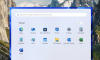
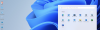
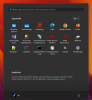
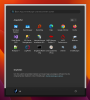
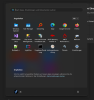
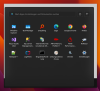
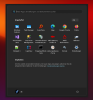
After updating to macOS 26.0 (Tahoe) and Parallels Desktop 26.1.1, I've started noticing a strange border / halo effect around the Windows 11 ARM Start Menu when it's opened.
Sometimes, when I open the Start Menu, it appears slightly shifted or misaligned for about a second, then it repositions itself correctly. The border looks like a semi-transparent frame surrounding the menu (see attached screenshot).
This issue didn't exist on earlier versions of macOS or Parallels -- it started appearing only after updating both the host and Parallels to the latest versions.
Setup details:
Has anyone else experienced this border / glow issue with the Start Menu in Windows 11 ARM?
Any known workaround or fix (e.g., boot flags like video.metal=0, or disabling specific macOS window effects)?
Thanks in advance!
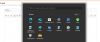
Sometimes, when I open the Start Menu, it appears slightly shifted or misaligned for about a second, then it repositions itself correctly. The border looks like a semi-transparent frame surrounding the menu (see attached screenshot).
This issue didn't exist on earlier versions of macOS or Parallels -- it started appearing only after updating both the host and Parallels to the latest versions.
Setup details:
- MacBook Pro M4 Max
macOS 26.0 - Parallels Desktop 26.1.1
- Windows 11 ARM (fully updated)
- Mode: happens both in Windowed and Coherence modes
- Reinstalling Parallels Tools
Checking graphics settings (auto vs Metal) - Restarting Windows / macOS
- Switching display modes
Has anyone else experienced this border / glow issue with the Start Menu in Windows 11 ARM?
Any known workaround or fix (e.g., boot flags like video.metal=0, or disabling specific macOS window effects)?
Thanks in advance!