Using duplicate cleaner, it won't delete any files

Daniel8

Bit poster
I used to use duplicate cleaner in windows 7 on my old computer. I'm now on a macbook with parallels 11, os x 10.11.1 and a virtual windows 10. but when i go to delete duplicate files it doesn't delete a single one and gives me the same error message for every file it attempts to delete, the message being 'delete error, cannot create a file when that file already exists'. it seems highly likely to me to be parallels related, something to do with the filesystem/organization of parallels virtual files

i have included a screenshot.
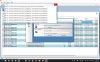
2015-11-04_140601.jpg
 
This issue could be related to how Parallels handles shared folders between macOS and the virtual Windows environment.

When you run Duplicate Cleaner inside Windows 10, it may identify duplicate files correctly but fail to delete them because of file permissions, shared folder access, or how the virtual machine manages file paths.

I would suggest trying these steps:

  1. Check whether Duplicate Cleaner has permission to modify or delete files in the selected folders.
  2. Try deleting a test duplicate from a normal Windows folder instead of a Mac shared folder.
  3. Run Duplicate Cleaner as an administrator.
  4. Check whether the affected files are stored inside the Windows virtual disk or on a shared Mac volume.
  5. Make sure the files are not open or being used by another application.
If the problem continues, you can also try another duplicate file finder. For example, SysTools Duplicate File Finder can scan selected folders and identify duplicate files based on their content. Review the scan results and test file removal on a small folder first.
webpage - https://www.systoolsgroup.com/duplicates-finder/


Before deleting duplicates, keep a backup of important files. This will help prevent accidental data loss.
 
Back
Top