Hello !
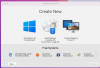
After upgrading to macOS Monterey and starting Parallels 16.5 I was not able to use/connect my - already installed and with previous macOS-versions used - Bootcamp-Partition because the Parallels Installation Assistant did not show the option „Use Windows from Boot Camp" like it traditionally did. This issue with Monterey and Intel-based Macs is already documented and there is no (official) workaround listed.
However I found a small guide to connect a Bootcamp-Partition to Parallels without choosing the mentioned option on the Installation Assistant:
https://kb.parallels.com/112941
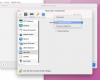
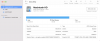
The problem with this was, that at the last step I did not know which file to choose as the „Source-File" for the installation. When I simply tried to select the entire Bootcamp-Disc-Partition I could not continue. Another thing that seemed not ok to me was that before I could go to select the „Source-File" I got the information that about 17GB of my disc-space would be needed. Since I already used Parallels with the Bootcamp-Partition before the Upgrade to Monterey plus the fact that I actually already have a working Bootcamp-Partition, I should normally not need any additional space or files, at least that's what I thought.
Has anyone had the same problem or could propose a solution ?
Thanks in advance for any answer !
After upgrading to macOS Monterey and starting Parallels 16.5 I was not able to use/connect my - already installed and with previous macOS-versions used - Bootcamp-Partition because the Parallels Installation Assistant did not show the option „Use Windows from Boot Camp" like it traditionally did. This issue with Monterey and Intel-based Macs is already documented and there is no (official) workaround listed.
However I found a small guide to connect a Bootcamp-Partition to Parallels without choosing the mentioned option on the Installation Assistant:
https://kb.parallels.com/112941
The problem with this was, that at the last step I did not know which file to choose as the „Source-File" for the installation. When I simply tried to select the entire Bootcamp-Disc-Partition I could not continue. Another thing that seemed not ok to me was that before I could go to select the „Source-File" I got the information that about 17GB of my disc-space would be needed. Since I already used Parallels with the Bootcamp-Partition before the Upgrade to Monterey plus the fact that I actually already have a working Bootcamp-Partition, I should normally not need any additional space or files, at least that's what I thought.
Has anyone had the same problem or could propose a solution ?
Thanks in advance for any answer !