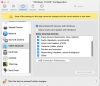
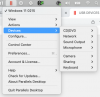
Hi, the same issue happened at my system (MB Pro 2020 M1, PD Version 18.1.1 (53328), Windows 11 ARM). I don't now what does happen with the configuration of VM exactly, but I'm sure It might have got you nervous

. After an hours when I was searching the solution I worked out the location of the configuration file which responds to show or not this menu (USB & Bluetooth). First things first, you should know, the problem is not in PD application, so an installation of new version or current of PD won't solve anything, because it depends on the configuration of VM. The next steps which describes the solution will have solved your problem:
1. Find the location of your VM. Right click on the PD which is running, then Control Center and right click again and Show in Finder.
2. Right click on VM (for example, Windows.pvm), then Show Package Content. Open Config.pvs with TextEdit or the similar app, then search the next string: <USB id="0" dyn_lists="">, below it you will have fined this string <Enabled>0</Enabled> which responds for the menu (USB & Bluetooth).
3. Replace 0 to 1, save and exit.
Good Luck!