USB and Bluetooth devices menu missing

MaguedB

Junior Member
I originally posted this on the M1 forum but didn't get much love, so I'm posting here...
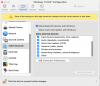
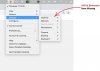
The external (USB and Bluetooth) device menu disappeared after I made some adjustments to the "Allowed external devices" in the "Configure" menu.
I tried re-installing parallels tools and restarting parallels and even restarting my Mac but that didn't fix it.
Does anyone know how can I restore this menu back?
This is an M1 machine with Parallels Windows 11.

Thanks,
Mags
 

Attachments

  • parallels2.png
    parallels2.png
    70 KB · Views: 19
  • parallels1.png
    parallels1.png
    95.2 KB · Views: 18
Hi GampaA and thanks for replying.
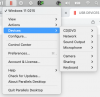
The issue I'm having is the "USB & Bluetooth" menu itself is missing (please see the attachment parallels2.png) I can assign USB devices to Windows/Mac using the "Configure" menu but I cannot do that as described in step 4 of the article you linked simply because the "External Devices" menu doesn't exist.
Regards
 
I'm not getting any error message. I can connect usb devices to both Mac/Windows via the "Usb connection Preferences" menu.
I cannot connect/disconnect usb devices to the VM using the "USB & bluetooth" menu because the menu is missing. Picture attached.

Parallel Error.jpg
 
I'm not getting any error message. I can connect usb devices to both Mac/Windows via the "Usb connection Preferences" menu.
I cannot connect/disconnect usb devices to the VM using the "USB & bluetooth" menu because the menu is missing. Picture attached.

View attachment 19455
Hello, are you using Parallels Desktop Standard Edition or Parallels Desktop App Store Edition?
 
Parallels Desktop Business edition. Please note that the "USB & Bluetooth" menu was available before and only disappeared when I assigned some of the usb devices to Mac/Windows using the configure menu.
Parallels_version.png
 
Hi Mags,
Did you find a solution to this issue? I have just had the same thing happen to me, and I can't find a solution anywhere.
Thanks,
Alex
 
I just re-installed parallels. Despite the trouble it was the approach that produced the least amount of headache after frustrating encounters with customer support.
 
That's frustrating but thanks for getting back to me. I haven't had any luck with customer support so far - I told them one of the things I'd tried was reinstalling Parallels Tools, which hadn't worked, and their advice was to try reinstalling Parallels Tools...!?! Perhaps I'll just have to reinstall everything.
Cheers,

Alex
 
Back
Top