
Hello,
I have been running an Activated, Licensed Windows 11 Pro ARM VM using the Insider Preview build on my Apple Silicon M1 Max MacBook Pro. After purchasing and activating a Windows 11 Pro license on the VM, Windows still shows the Insider Preview Evaluation copy / prerelease notice in the bottom right corner (see screenshot):

Now that Windows 11 Pro ARM is officially supported on Parallels I would like to update this build to the official Windows release and eliminate the Insider Preview and Evaluation copy watermark.
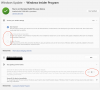
I would appreciate some guidance on the best way to accomplish this. I've tried changing the Insider Preview settings in Windows but they are all greyed-out and unchangeable:
Any suggestions are appreciated. Thanks!
I have been running an Activated, Licensed Windows 11 Pro ARM VM using the Insider Preview build on my Apple Silicon M1 Max MacBook Pro. After purchasing and activating a Windows 11 Pro license on the VM, Windows still shows the Insider Preview Evaluation copy / prerelease notice in the bottom right corner (see screenshot):
Now that Windows 11 Pro ARM is officially supported on Parallels I would like to update this build to the official Windows release and eliminate the Insider Preview and Evaluation copy watermark.
I would appreciate some guidance on the best way to accomplish this. I've tried changing the Insider Preview settings in Windows but they are all greyed-out and unchangeable:
Any suggestions are appreciated. Thanks!


