
Hi @AlL,
I am running a Macbook Pro Retina late 2013.
I had OSX Sierra 10.12 in the latest Version running + PD pro edition 13.2.0
As guest I had also a OSX Sierra 10.12 latest Version running. Parallels Tools are installed.
What happend now is I wanted to upgarde the VM from Sierra to High Sierra.
Update worked fine to 10.13.1. I could boot the VM and everything. Then I updated through the App Store to 10.13.2 and that broke my guest
You can see the user icon, type in your password, OSX accepts it and then the machine is stuck.
I added to the Boot Sequenz configuration the following line to get into Safe Mode
devices.mac.boot_args="-x -v"
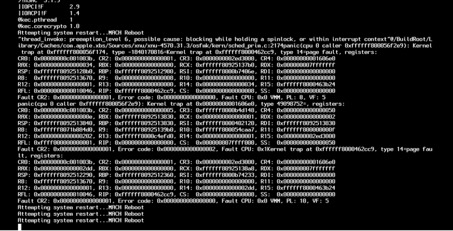
and it keeps being stuck with the following message
I thought that the update broke the VM, so I did a fresh installation of a High Sierra VM to 10.13.1 which worked fine, but then updated it again to 10.13.2 and ended up with the same issues even with the fresh install.
So I thought it might be a problem with my Macbook still running Sierra so I updated my MacBook also to High Sierra 10.13.2 incl. all Hotfixes.
But I still have the same issues. I can't get a VM running with High Sierra 10.13.2 or fix my broken VMs.
After that I tried to downgrade PD to 13.1.1 (43120) but the issue remains.
Is there a solution for this problem?
Thanks a lot
Bjoern
I am running a Macbook Pro Retina late 2013.
I had OSX Sierra 10.12 in the latest Version running + PD pro edition 13.2.0
As guest I had also a OSX Sierra 10.12 latest Version running. Parallels Tools are installed.
What happend now is I wanted to upgarde the VM from Sierra to High Sierra.
Update worked fine to 10.13.1. I could boot the VM and everything. Then I updated through the App Store to 10.13.2 and that broke my guest
You can see the user icon, type in your password, OSX accepts it and then the machine is stuck.
I added to the Boot Sequenz configuration the following line to get into Safe Mode
devices.mac.boot_args="-x -v"
and it keeps being stuck with the following message
I thought that the update broke the VM, so I did a fresh installation of a High Sierra VM to 10.13.1 which worked fine, but then updated it again to 10.13.2 and ended up with the same issues even with the fresh install.
So I thought it might be a problem with my Macbook still running Sierra so I updated my MacBook also to High Sierra 10.13.2 incl. all Hotfixes.
But I still have the same issues. I can't get a VM running with High Sierra 10.13.2 or fix my broken VMs.
After that I tried to downgrade PD to 13.1.1 (43120) but the issue remains.
Is there a solution for this problem?
Thanks a lot
Bjoern