
Install the app
How to install the app on iOS
Follow along with the video below to see how to install our site as a web app on your home screen.
Note: This feature may not be available in some browsers.
You are using an out of date browser. It may not display this or other websites correctly.
You should upgrade or use an alternative browser.
You should upgrade or use an alternative browser.
Update 14.1.13 (45485)
- Thread starter KelvinM1
- Start date

Maria@Parallels
Problem solver
Hi, please try to go to actions menu -> and click "reset"
Since installing Update 14.1.13 (45485) tonight, Microsoft Security Essentials virus scanning locks up on Windows XP after the service stops with an error AND also while scanning Windows 7 VMs (Win7 VMs can recover).
[UPDATE: Solved by installing today's new virus definitions.]
[UPDATE: Solved by installing today's new virus definitions.]
Last edited:
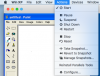
Thanks - the graphic helped and I found this menu are closing windows - restarted and all 100%Hi, please try to go to actions menu -> and click "reset"
Thanks for your help