
I am using the latest version of Parallels 15 and I would like to game on Windows 10 using my Bootcamp image via Parallels. Lately, however, games refuse to start.
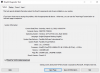
When I try to play Forza Horizon 4, I get an error message saying that my Graphics card doesn't support DX12 although when running dxdiag within Parallels there are no problems detected and it says "DirextX Version: DirectX 12".
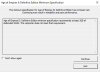
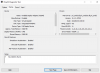
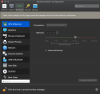
When starting Age of Empires II: Definitive Edition, I get an error message stating that the game recommends at least 2GB of dedicated VRAM and that my computer doesn't meet that requirement. Again, when checking dxdiag, 8GB is listed as VRAM as I set the graphics memory for Parallels to "Auto (Recommended)" and have allocated 16GB of regular virtual memory (my Mac has a total of 32 RAM).
I already tried installing Parallels Toolbox for Windows and I tried reinstalling the toolbox for Mac, both to no avail...
I am very disappointed because I bought Parallels 15 exactly to be able to casually play a game without rebooting. Could someone please suggest how I get the Parallels graphics card/driver properly recognized by Windows in the vm?
When I try to play Forza Horizon 4, I get an error message saying that my Graphics card doesn't support DX12 although when running dxdiag within Parallels there are no problems detected and it says "DirextX Version: DirectX 12".
When starting Age of Empires II: Definitive Edition, I get an error message stating that the game recommends at least 2GB of dedicated VRAM and that my computer doesn't meet that requirement. Again, when checking dxdiag, 8GB is listed as VRAM as I set the graphics memory for Parallels to "Auto (Recommended)" and have allocated 16GB of regular virtual memory (my Mac has a total of 32 RAM).
I already tried installing Parallels Toolbox for Windows and I tried reinstalling the toolbox for Mac, both to no avail...
I am very disappointed because I bought Parallels 15 exactly to be able to casually play a game without rebooting. Could someone please suggest how I get the Parallels graphics card/driver properly recognized by Windows in the vm?
Attachments
-
 Screenshot 2020-03-21 at 20.54.40.png142.8 KB · Views: 9
 -
 Screenshot 2020-03-21 at 20.55.10.png135.8 KB · Views: 9
 -
 Screenshot 2020-03-21 at 20.56.21.png369.5 KB · Views: 9
 -
 Screenshot 2020-03-21 at 20.56.59.png289.4 KB · Views: 8
 -
 Screenshot 2020-03-21 at 21.04.01.png265.1 KB · Views: 7
 -
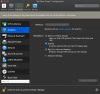 Screenshot 2020-03-21 at 21.04.08.png291.5 KB · Views: 8
