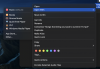
P PhilipM12 Bit poster Mar 23, 2022 #1 I have a 2020 macbook pro with a M1 chip. I used parallels for a while and found it didn't work for me. I have uninstalled Parallels, however there are still traces of applications. How do i get rid of these.
I have a 2020 macbook pro with a M1 chip. I used parallels for a while and found it didn't work for me. I have uninstalled Parallels, however there are still traces of applications. How do i get rid of these.
B Bhargava Bit poster Mar 24, 2022 #2 Hello, please locate the Windows .pvm file by referring to this https://kb.parallels.com/117333 and delete it to resolve the issue. Thanks.
Hello, please locate the Windows .pvm file by referring to this https://kb.parallels.com/117333 and delete it to resolve the issue. Thanks.
M McallenT@P Parallels Team Mar 24, 2022 #3 PhilipM12 said: I have a 2020 macbook pro with a M1 chip. I used parallels for a while and found it didn't work for me. I have uninstalled Parallels, however there are still traces of applications. How do i get rid of these. View attachment 19373 Click to expand... Hello, Please refer to this KB article: https://kb.parallels.com/en/124255 and check. Thanks, Parallels Team.
PhilipM12 said: I have a 2020 macbook pro with a M1 chip. I used parallels for a while and found it didn't work for me. I have uninstalled Parallels, however there are still traces of applications. How do i get rid of these. View attachment 19373 Click to expand... Hello, Please refer to this KB article: https://kb.parallels.com/en/124255 and check. Thanks, Parallels Team.
P PhilipM12 Bit poster Mar 24, 2022 #4 I have done this. Also deleted anything related to parallels that i could find and yet it still shows
I have done this. Also deleted anything related to parallels that i could find and yet it still shows