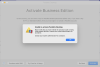
I am unable to activate Parallels Desktop for Mac Business Edition on my new MacBook Pro. The error dialog I get is "Unable to activate Parallels Desktop.", Please verify that you have entered the activation code correctly...
At first I tried to use the same activation code as I had used on my older MacBook Pro. That gave me the same error.
Now I have received a new email from Parallels with a link to download the installer. The installer runs and then tries to activate. The activation fails. If I try to enter the activation code myself, that also fails. Always the same error (as noted above).
I've tried activating with the firewall and virus protection turned off. Same error.
I've tried uninstalling and reinstalling many times. No luck.
When our system admin logs in to his Parallels management account he sees both my old and new computer as registered and activated.
I don't know what else to try.
At first I tried to use the same activation code as I had used on my older MacBook Pro. That gave me the same error.
Now I have received a new email from Parallels with a link to download the installer. The installer runs and then tries to activate. The activation fails. If I try to enter the activation code myself, that also fails. Always the same error (as noted above).
I've tried activating with the firewall and virus protection turned off. Same error.
I've tried uninstalling and reinstalling many times. No luck.
When our system admin logs in to his Parallels management account he sees both my old and new computer as registered and activated.
I don't know what else to try.