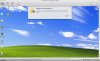
Unable to access Hard Disk 1: Error ID: Input/output error

This error happens every time I run parallels for 1hr+ or run an antivirus scan or adaware scan.

I submitted an error report #210428.

I have looked at other forum comments but none seem to be what I am finding. Please advise.

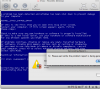
The last time the error happened it threw Windows Vista into a blue error screen.

"Unable to access Hard Disk 1
An error occurred when accessing the hard disk. Error ID: Input/output error."
 

Attachments

  • Picture 5.png
    Picture 5.png
    70.6 KB · Views: 63
Same problem

Tried reinstalling Windows XP, get the same error. Won't even install. Please post the solution!
 
Hello Grant Leitheiser,

Please check your Macintosh HD (Applications -> Disk Utilities -> verify the disk)

Also please check system log (Apple sign-> about Mac -> more info -> logs, check if you have I/O errors there)

Seems to be there is some corrupted sectors on Macintosh disk
 
Hi galochka,

I tried your method, but did not work for me. In addtion, the message dispeared when I remove the vitual machine from my list, however, it come back if I run virtual machine a few times.

Please help me with this issue, thanks in advance.
 
Same problem: error ID: input / output

Everything has been fine then suddenly I can't boot Windows XP Pro. I ran disk utility to verify and no problems. It will start eventually, but I cannot run any programs or open folders and it locks my entire machine.

Please help,

Jeff
 
Same issue

I hardly ever use this program and am having the issue. It is very annoying. Work for about 45 minutes or so then have "unable to access hard drive" come up. Don't think it's a Mac HD issue. I load Parallels then start Window and walk away. 30 to 45 minutes later (sometimes within 10 min) the error is there. This not what I signed up for. Would like to have a solution to this problem.
 

Attachments

  • HDD Error.jpg
    HDD Error.jpg
    149.7 KB · Views: 35
same problem: input/output error

...then XP is unresponsive. It happens within 2 or 3 minutes of booting into XP. This is not a Boot Camp partition. Parallels crashed the Boot Camp partition during my upgrade from 3 to 4 earlier this year.

Report ID 420354
 
I've had this problem MANY times. I'm always told "hard drive corruption on your Mac". And yes, that's correct. There is hard drive corruption. So I "repair" that, which last time ended up wiping out the drive's ability to boot. Then I reinstalled the guest VMs from scratch, and now I'm getting the same problem again. I've even changed my Mac's hard drive to try and fix this problem.

Why is it that the only file that ever goes corrupt is my parallels image?

Robert
 
I am having the same exact issue. I am running Snow Leopard with Parallels 4. I have a boot camp partition running Windows Vista. After a while of using Vista inside of Parallels, I receive the same "Unable to Access Hard Disk 1: Input Output Error"
If I boot directly into Vista it works fine. I have checked the disk using Disk Utility, and everything is fine. I have checked the system log and there is nothing in there regarding this.
What has been done to fix this problem? If any of the users in the forum have solved it, please let me know. If any of the tech support personnel have a fix, please get back to me ASAP. Thank you!
 
I have the same exact problem. Has anybody had any luck fixing this Unable to Access Hard Disk 1, Input/Output error?
I am ready to ask for my money back on this product if I can't get this working. I can't stay logged into Windows Vista for longer than an hour without this message coming up and crashing whatever I was doing.
Any help is much appreciated.
 
How many people have not yet had this situation resolved?

How many of you are still having this input/output error? If enough of us complain repeatedly of this, then Parallels would be ethically obliged to correct the problem.
 
I have had this problem a few times in the past couple of months - parallels has been running fine then it just stops.
same error - no corruption on either disk.
 
Guys, if you look in your system log - you will see some messages from Mac kernel, that your hard drive fails to do something: read or write data. This is the reason of the input/output error message.

The message comes from mac kernel when Parallels tried to access data on virtual disk and then Parallels just shows it.

As a workaround i can only offer to try to copy your virtual machine to other drive, add it to Parallels and run it, the problem will gone away. But only if you can copy it...
 
Still doesn't work

Hi Ynot,

I tried this. Moved the VM to another volume and the VM started up. But after 20 mins. working in XP: same error again!!
The problems started suddenly this week and the error keeps popping up ever since more frequent every day it seems. Bottom line is that I were not able to work with Parallels the for days now. I've tried every thing both on the mac and on the parallels side. No results at all. Since Parallels is the only application on my Mac that triggering the error I really think that it is a Parallels issue and not a Leopard issue. I'm using Snow with the latest Paralells...

Please enlighten us!!


Bart
 
I am having this problem too

In recent days, my Window session would hang, randomly. I could try to stop it, but was left with "Stop" as the only available option under the VM menu. Only fix was rebooting the Mac.

Today, I started getting the "Unable to access Hard Disk 1" (or 3) error, every time I try booting windows.

So, I'm cracking out ye olde windows laptop until I can figure this out.
 
More info

OK, here's the system log when I get this error:
Oct 29 14:47:44 macbook-pro-4 kernel[0]: MacFUSE: starting (version 2.0.3, Dec 19 2008, 09:57:57)
Oct 29 14:48:03 macbook-pro-4 kernel[0]: /drv/ MacAsyncDevice.cpp:229 Wait for host_wait_work_complete_async_device (02:02) finished with timeout.
Oct 29 14:48:09: --- last message repeated 6 times ---
Oct 29 14:48:09 macbook-pro-4 kernel[0]: disk0s2: I/O error.
Oct 29 14:48:09 macbook-pro-4 kernel[0]:
Oct 29 14:48:10: --- last message repeated 1 time ---
Oct 29 14:48:10 macbook-pro-4 kernel[0]: /drv/ MacAsyncDevice.cpp:229 Wait for host_wait_work_complete_async_device (02:02) finished with timeout.
Oct 29 14:48:25: --- last message repeated 15 times ---
Oct 29 14:48:25 macbook-pro-4 kernel[0]: disk0s2: I/O error.
Oct 29 14:48:25 macbook-pro-4 kernel[0]:
Oct 29 14:48:55: --- last message repeated 1 time ---

The disk utility says my HD seems A-OK.

Suggestions?
 
Follow-up

Well, I can't copy any of my .hdd or .hds files; the copy gets about half way and then fails with error -36 or some such.

Yet Disk Utility and fsck find nothing, and running applejack (gave it a shot) didn't change the situation.

Can anyone recommend a good utility for searching out bad sectors, or something? I haven't found anything that seems like the right tool. Otherwise, I am going to try to create a new boot drive and see if I can at least salvage my work drive contents.
 
Same problem

Same error... and the MAC log give me more or less the same message as reported by syphax.
I have this error only when I install a software from a CD, virtual CD or a windows update (like SP3 for XP).
I tried to change the size of the virtual disk, and for unknow reason it was solved... but only for one time.
All my check one the MAC disk are OK... and moreover I had delete e recreated the virtual machine.
I need a solution, but not like 'use an external hard drive'!

Dino
 
Back
Top