
Install the app
How to install the app on iOS
Follow along with the video below to see how to install our site as a web app on your home screen.
Note: This feature may not be available in some browsers.
You are using an out of date browser. It may not display this or other websites correctly.
You should upgrade or use an alternative browser.
You should upgrade or use an alternative browser.

Maria@Parallels
Problem solver
Hello, from where did you transfer your VM?I just upgraded to PD16.
It seems like PD16 has a new format for VM transferring. I have successfully created the transfer image. However, I cannot unpack the image.
The error message says that "You don't have the permission to write <folder>".
View attachment 16418
Did you check the permission if your .pvm file? Do you have all permissions for your .pvm?
Maria@Parallels
Problem solver
Hello, please reproduce the issue and collect the tech report data right after that.
Then please post the report's ID here.
Looking forward to your reply
Then please post the report's ID here.
Looking forward to your reply
Maria@Parallels
Problem solver
Hey, we're looking forward to you reply and technical data. Please get it touch with us at your earliest convenience.The directory and .pvmp file have the correct permission.
I copied the .pvmp file from another MacBook.
View attachment 16419
Maria@Parallels
Problem solver
Great news! Thanks a lot for sharing this. Did you perform any specific steps to transfer it?Sorry for the late reply.
I successfully transferred other VMs. However, I cannot reproduce this issue. Because the original .pvmp file has been deleted.
Anyway, I have recovered the VN with another backup, and thanks for your help.
Also if you have any additional questions please feel free to ask.
Last edited:
Colin-Chen-SZ
Bit poster
Hello my friend,
I have facing a similar problem, but I can't solve it unfortunately.
Now I have two MACs, their difference is SSD size, the old one SSD is 512G, the new one SSD is 2T.
The VM in my old MAC was packed because SSD too small no space to run VM, Win10 couldn't start, the system packed the VM. so the old MAC couldn't work.
I called your servicer in China, she told me I have to transfer the packed VM to another MAC to unpack, which has installed parallels desktop.
So I bought a new MAC with 2T SSD, but it failed to unpack the packed VM in my new MAC, because I don't have permission to write into the folder windows 10.pvmp.
The Parallels Desktop edition is pro 16 for both MACs, also Windows 10 family Edition.
dear friend, could you please help me? thank you in advance.
Best Regards
Colin Chen
I have facing a similar problem, but I can't solve it unfortunately.
Now I have two MACs, their difference is SSD size, the old one SSD is 512G, the new one SSD is 2T.
The VM in my old MAC was packed because SSD too small no space to run VM, Win10 couldn't start, the system packed the VM. so the old MAC couldn't work.
I called your servicer in China, she told me I have to transfer the packed VM to another MAC to unpack, which has installed parallels desktop.
So I bought a new MAC with 2T SSD, but it failed to unpack the packed VM in my new MAC, because I don't have permission to write into the folder windows 10.pvmp.
The Parallels Desktop edition is pro 16 for both MACs, also Windows 10 family Edition.
dear friend, could you please help me? thank you in advance.
Best Regards
Colin Chen

Maria@Parallels
Problem solver
Hello, are you able to give all permissions to your pvmp. folder?
Colin-Chen-SZ
Bit poster
Hello Maria,
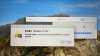
Thank you for your message, sorry I don't know how to give any permissions to my pvmp folder, please check enclosed photo.
the folder "windows 10.pvmp" always shows 100%, so I couldn't choose it
Could you please show me the correct process, Maria? thank you in advance.
Best Regards
Colin Chen
Thank you for your message, sorry I don't know how to give any permissions to my pvmp folder, please check enclosed photo.
the folder "windows 10.pvmp" always shows 100%, so I couldn't choose it
Could you please show me the correct process, Maria? thank you in advance.
Best Regards
Colin Chen
Attachments
Maria@Parallels
Problem solver
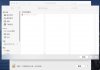
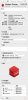
Are you able to right-click on your folder and choose "get info"?Hello Maria,
Thank you for your message, sorry I don't know how to give any permissions to my pvmp folder, please check enclosed photo.
the folder "windows 10.pvmp" always shows 100%, so I couldn't choose it
Could you please show me the correct process, Maria? thank you in advance.
Best Regards
Colin Chen
If yes, please share the screenshot of new opened window here
Colin-Chen-SZ
Bit poster
Colin-Chen-SZ
Bit poster
Dear Maria,
I would like to share an operating process with you.
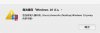
After open Parallels Desktop on my new MAC, once I right click the packed VM windows 10.pvmp, Dialog Box 1 appeared.
Have You Copied or Removed "Windows 10 (1)"?
If this VM was copied from another VM, it must have its own MAC address then can make sure the net can run well. If you would like to set up the MAC's address, please press [Copied].
if need more details, please refer to here.
[REMOVED] [COPIED]
there are two buttons [REMOVED] and [COPIED], if press any one of them, Dialog Box 2 appeared, no change.
No Way to Store [Windows 10 (1)].
You don't have the permission to write into the folder /User/chencolin/Desktop/Windows 10.pvmp
That's all.
Hope you will discover the position of the issue.
Thank you for your help.
Best Regards
Colin Chen
I would like to share an operating process with you.
After open Parallels Desktop on my new MAC, once I right click the packed VM windows 10.pvmp, Dialog Box 1 appeared.
Have You Copied or Removed "Windows 10 (1)"?
If this VM was copied from another VM, it must have its own MAC address then can make sure the net can run well. If you would like to set up the MAC's address, please press [Copied].
if need more details, please refer to here.
[REMOVED] [COPIED]
there are two buttons [REMOVED] and [COPIED], if press any one of them, Dialog Box 2 appeared, no change.
No Way to Store [Windows 10 (1)].
You don't have the permission to write into the folder /User/chencolin/Desktop/Windows 10.pvmp
That's all.
Hope you will discover the position of the issue.
Thank you for your help.
Best Regards
Colin Chen
Attachments

I'm having similar issues with PD16 Pro. I can package a macOS VM and move it to external storage with no problem, checksum validates fine. The problem comes when I try to unpack it: it opens as an unknown VM with no OS and deletes the .pvmp, leaving in its place 2 unknown files (second one's name implies it's a backup of the first). Right-click on the file does not show the commands indicated in the documentation, neither does right-click on the unknown VM created by having PD open the .pvmp file, and starting the unknown VM displays a message that there's no OS from which to boot.
Colin-Chen-SZ
Bit poster
Hello my friend,Hello Maria,
Look forward to answers, thank you
Any news for the issue?
Thank you?
Maria@Parallels
Problem solver
Hello guys, looks like it's a know issue and Parallels Engineering Team are currently working on it.
We will update you once we get any news.
Thank you for cooperation with us.
We will update you once we get any news.
Thank you for cooperation with us.