Transfer Boot Camp installation to another computer

MartinR5

Bit poster
I am trying to transfer a Parallels VM Boot Camp installation to another computer. However, the Create New modal window does not display an option for using bootcamp. The 3 options display are "Get Windows 10", "Install Windows...", "Transfer Windows...". I tried checking the KB article referenced ( KB 123027) but that link is invalid. I also tried installing the transfer agent on the boot camp VM but it fails with a CHKDSK error. I am using Parallels 13 Pro edition and it is up to date. Has anyone else had this issue and is there a solution.

Thanks

Martin Reich
 
I am trying to transfer a Parallels VM Boot Camp installation to another computer. However, the Create New modal window does not display an option for using bootcamp. The 3 options display are "Get Windows 10", "Install Windows...", "Transfer Windows...". I tried checking the KB article referenced ( KB 123027) but that link is invalid. I also tried installing the transfer agent on the boot camp VM but it fails with a CHKDSK error. I am using Parallels 13 Pro edition and it is up to date. Has anyone else had this issue and is there a solution.

Thanks

Martin Reich
You can transfer Bootcamp Windows from one Mac to another Mac but on the new Mac it will be a standalone virtual machine not a Bootcamp based.
 
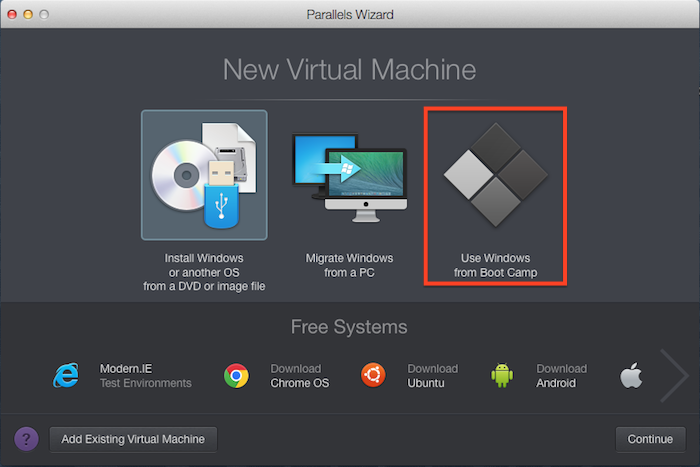
Click Use Windows from Boot Camp, and then follow the onscreen instructions.

Screen%20Shot%202014-10-02%20at%2013.10.04%20.png


If you don't see the BootCamp option, please visit KB 123027.

Important: The first time you start Windows after setting Parallels Desktop to work with Boot Camp, Parallels Tools is installed to allow seamless operation between Windows® and Mac OS® X. Once Parallels Tools is installed, you will be prompted to restart Windows.

I do not see this screen and KB 123027 is not in the system and marked as 'outdated'. Instead ot 'Use Windows From Boot Camp' I see 'Transfer Windows From a PC'. I would like to accomplish the transfer by creating a new virtual machine without having to resort to using the transfer agent and CHKDSK.
 
I tried the creating a Bootcamp based VM but the Bootcamp partition does not appear on the source drop down list. I checked Disk Utilities and the partition is present (but greyed out). The only items that appear in the source drop down list are *.hdd image files.
 
I tried the creating a Bootcamp based VM but the Bootcamp partition does not appear on the source drop down list. I checked Disk Utilities and the partition is present (but greyed out). The only items that appear in the source drop down list are *.hdd image files.
Let us know the macOS X and Parallels Desktop version you have on your old Mac.
 
I know this might be a silly question but when I 'remove' the VM will it delete the BootCamp files or just the .PVM file that points to it? Also, do I need to recreate the .PVM file to transfer or can I just transfer the BootCamp file without re-creating the .PVM?

Thanks.
 
I followed the instructions in the article. I am able to use the existing BootCamp partition on the flash drive to create a new Parallels VM. However, this is not what I want to accomplish. I want to move the existing BootCamp off of the flash drive onto an external drive and create a Parallels VM on the external drive using the copy of the BootCamp. I will then delete the BootCamp from my Flash Drive and free up space. Is it even possible to do this or must I use Acronis to create a backup of the BootCamp and then restore it into a fresh VM?

Thanks.
 
Hi @MartinR5 , you can move the .pvm file from the flash drive to the external drive and connect the external drive and check if the Windows virtual machine works fine. Once it is good, you can go ahead and delete the virtual machine on the flash drive.
 
UPDATE - Resolved: Using the File/Import From Boot Camp... option I was able to move the Boot Camp partition to an external drive and then launch the VM.
 
Back
Top