
Install the app
How to install the app on iOS
Follow along with the video below to see how to install our site as a web app on your home screen.
Note: This feature may not be available in some browsers.
You are using an out of date browser. It may not display this or other websites correctly.
You should upgrade or use an alternative browser.
You should upgrade or use an alternative browser.
Toolbox - Download Video - Not working with YouTube
- Thread starter JimP52
- Start date
Where would I check for these settings?
I don't use a VPN.
If I don't have a browser active at the time I initiate a Toolbox Video Download, how would an ad blocker have an affect?
What is "something similar"?
I was able to download videos recently, and then it just stopped working.
I don't use a VPN.
If I don't have a browser active at the time I initiate a Toolbox Video Download, how would an ad blocker have an affect?
What is "something similar"?
I was able to download videos recently, and then it just stopped working.

sergk
Parallels Developers
Please generate technical report (https://kb.parallels.com/en/124107) and post its ID here, it can help to understand the reason of your issue.
Not sure if "sergk" saw this so replying again.Please generate technical report (https://kb.parallels.com/en/124107) and post its ID here, it can help to understand the reason of your issue.
Created report ID - 360934506
sergk
Parallels Developers
Thanks for report ID,
But I don't see information about failures of Download Video in your report. Please do the next:
- Enable 'Use detailed log messages' option in Toolbox preferences (open Toolbox window -> cogwheel -> Preferences);
- Restart Download Video tool;
- Try to download any video again;
- Generate technical report again and post its ID here again.
But I don't see information about failures of Download Video in your report. Please do the next:
- Enable 'Use detailed log messages' option in Toolbox preferences (open Toolbox window -> cogwheel -> Preferences);
- Restart Download Video tool;
- Try to download any video again;
- Generate technical report again and post its ID here again.
Here is another ID - 361032465Thanks for report ID,
But I don't see information about failures of Download Video in your report. Please do the next:
- Enable 'Use detailed log messages' option in Toolbox preferences (open Toolbox window -> cogwheel -> Preferences);
- Restart Download Video tool;
- Try to download any video again;
- Generate technical report again and post its ID here again.
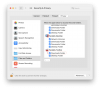
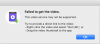
sergk
Parallels Developers
Let's check if internal utility that actually downloads the video works fine. In Terminal launch this command:
It will launch downloading of first video you've provided earlier. Wait till completion and copy paste output from Terminal here. Note - if downloading is successful then launch this command
to open folder in Finder.
Code:
/Applications/Parallels\ Toolbox.app/Contents/Applications/Download\ Video.app/Contents/Resources/dl https://youtu.be/zA8pVC_tPt8
Code:
open .Here is the contents of my Terminal session:
++++++++++++++++++++++++++++++++++++++
The default interactive shell is now zsh.
To update your account to use zsh, please run `chsh -s /bin/zsh`.
For more details, please visit https://support.apple.com/kb/HT208050.
MBP-2014-Jim:~ jkpalmer$ /Applications/Parallels\ Toolbox.app/Contents/Applications/Download\ Video.app/Contents/Resources/dl
[youtube] zA8pVC_tPt8: Downloading webpage
ERROR: Unable to download webpage: HTTP Error 429: Too Many Requests (caused by HTTPError()); please report this issue on https://yt-dl.org/bug . Make sure you are using the latest version; type youtube-dl -U to update. Be sure to call youtube-dl with the --verbose flag and include its complete output.
MBP-2014-Jim:~ jkpalmer$
++++++++++++++++++++++++++++++++++++++
Jim Palmer
++++++++++++++++++++++++++++++++++++++
The default interactive shell is now zsh.
To update your account to use zsh, please run `chsh -s /bin/zsh`.
For more details, please visit https://support.apple.com/kb/HT208050.
MBP-2014-Jim:~ jkpalmer$ /Applications/Parallels\ Toolbox.app/Contents/Applications/Download\ Video.app/Contents/Resources/dl
ERROR: Unable to download webpage: HTTP Error 429: Too Many Requests (caused by HTTPError()); please report this issue on https://yt-dl.org/bug . Make sure you are using the latest version; type youtube-dl -U to update. Be sure to call youtube-dl with the --verbose flag and include its complete output.
MBP-2014-Jim:~ jkpalmer$
++++++++++++++++++++++++++++++++++++++
Jim Palmer
I did a search on the internet for something that discusses YouTube blocking my IP because of too many requests to download videos. I was not successful.Looks like youtube blocked your IP for some time because of too many requests to download the videos. Usually the possibility to download returns after some days.
Would it be possible for you to share more information about YouTube's download limits and practices with dealing with abuse?
Jim P.
sergk
Parallels Developers
> Would it be possible for you to share more information about YouTube's download limits and practices with dealing with abuse?
We can't control and we don't know how and why youtube (or any other video hosting) blocks requests. But practice shows that if you're using tools that downloads video from youtube too often (dozens of times per day) youtube just blocks you. There are some tricks you can try:
1) Use VPN while download videos. It will change your IP and you will be able to download videos.
2) Try to launch this command from Terminal. I added "--force-ipv4" parameter, it may help. Copy and paste here output of this command.
We can't control and we don't know how and why youtube (or any other video hosting) blocks requests. But practice shows that if you're using tools that downloads video from youtube too often (dozens of times per day) youtube just blocks you. There are some tricks you can try:
1) Use VPN while download videos. It will change your IP and you will be able to download videos.
2) Try to launch this command from Terminal. I added "--force-ipv4" parameter, it may help. Copy and paste here output of this command.
Code:
/Applications/Parallels\ Toolbox.app/Contents/Applications/Download\ Video.app/Contents/Resources/dl --force-ipv4 https://youtu.be/zA8pVC_tPt8