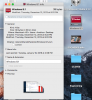
The windows drive icon mounted on Mac Desktop is broken.

Follow up - I was able to get the icon to show correctly with this trick.

1) On the desktop Control Click Show View Options
2) Change the icon size to 32x32
3) Close view options
4) On the desktop press control click a second time and choose Show View options a second time.
5) Change the icon size back to 64x64 - your desktop will be back to normal at this stage and parallels will have the right icon.
 
Hi Dave - good try and thanks, but no joy. Attached is an image of my desktop after following your instructions. I still have the 8.1 icon. Too bad:(
 

Attachments

  • Screen Shot 2016-01-22 at 11.03.00 AM.png
    Screen Shot 2016-01-22 at 11.03.00 AM.png
    309.5 KB · Views: 4
same problem here, since today when you zoom the icon size beyond 32/32 the icon turns into a white page. Did they really forget to scale or code scaling for the icon?
 
I am running Parallels 10 on a MacBook 12" (2015) with OSX Yosemite with a Plugable 3 external monitor setup, using two HP Compaq LA2306x displays. The DisplayLink drivers are version 2.5.1.

Parallels creates a Virtual Disk icon on the Mac Desktop [C: Windows]. This icon is scalable normally, but when the external display(s) are selected as primary displays (instead of the laptop display), the icon turns into a broken icon/white page at a scale larger than 32x32 (normal is 60x60). This turning into a white icon does not occur when the MacBook is chosen as primary display and one ore more secondary displays are connected. However, it does occur when one of the external displays are chosen as primary display in the Mac settings AND there are two external displays connected, or if a connected single display uses the HDMI port to connect via a HDMI to DVI cable to an external display, when using the 4K HDMI outlet.

This desktop icon turning empty does not occur with any other desktop icon on the Mac desktop (regardless of choice of primary display) or any icon on the windows desktop (through Parallels) on either display. The work around is to chose the MacBook 12 as primary display.

Any thoughts? Any improvements or known issues between Parallels and DisplayLink drivers?
 
Back
Top