nickjbedford
Junior Member
Am I missing something? I just paid for Parallels 26 to try properly updating/creating a Tahoe 26.3 guest VM on my Tahoe Intel iMac 5K.
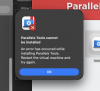
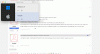
Both a new installation and my upgraded macOS installation are completely broken. Parallels Tools fails to install but when I try to do anything in Settings like Allowing the installation the VM acts like it's running on a 486 from 1985.
New installation also fails to install. I've submitted a support ticket but I can't even get into Settings withoout the whole VM just dying.
What is going on? I paid for this Parallels update and it's absolute junk. I've been using Sequoia and previous VMs perfectly up until now.
Both a new installation and my upgraded macOS installation are completely broken. Parallels Tools fails to install but when I try to do anything in Settings like Allowing the installation the VM acts like it's running on a 486 from 1985.
New installation also fails to install. I've submitted a support ticket but I can't even get into Settings withoout the whole VM just dying.
What is going on? I paid for this Parallels update and it's absolute junk. I've been using Sequoia and previous VMs perfectly up until now.