System sound was not recorded when recording screen (window, specified area) on M1 mac

AkiraN

Junior Member
Hi, I'm using Paralles Toolbox for mac on my M1(apple silicon) macbook air Big Sur (11.2). Toolbox version is latest, 4.1.1(3698).
I tried to record screen with system sound (not mic) but failed. It only recorded video but no sounds.
I re-installed sound driver according to another thread but nothing was changed.
If I use recording with microphone, it works.
@parallels Could you check and fix it, please?
 
Hello,
some questions for you:
- Does problem exist while recording any sound from computer of from concrete applications? For example, is there a problem if record video with sound from youtube?
- Please generate technical report and post its ID here (https://kb.parallels.com/en/124107);
 
Hello,
Thank you for reply. I just confirmed both this problem happens with youtube (chrome), VLC and Quick Time Player.
I'll generate tech report with ID 361522284.
Thanks.
 
Try this:
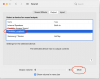
- Open System Preferences application -> Sound -> Output;
- Launch screen recording;
- Switch to System Preferences app again;
- Click on 'Parallels Loopback' device in the гззук list;
- Check 'Mute' checkbox. It should be UNchecked. Uncheck it (if not), stop current recording;
- Start recording again;
2.png
 
Hello,
Thank you for advice.
I tried it but nothing was solved.
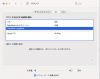
You can see my screen shot and may find unchecked mute.
Thanks.
 

Attachments

  • スクリーンショット 2021-02-08 22.44.56.png
    スクリーンショット 2021-02-08 22.44.56.png
    265.4 KB · Views: 6
> I re-installed sound driver according to another thread but nothing was changed.
Could you please share link to this thread? I need to check these instructions.
 
Back
Top