MuhsinFatih
Bit poster
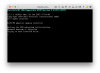
Parallels is stuck when trying to boot into Ubuntu on external device (usb). This usb has ubuntu installed in it, not the installation media, but actual Ubuntu which I boot with grub on startup. I selected "External device" in hardware > boot order, and selected my usb as external boot drive. Looking at the log file I realised that Parallels tries to mount the usb twice, resulting an error as it gets rejected. Screenshot of error and log file are as follows:
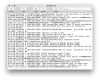
Here is the full log file:
parallels.log.txt
If my intention is not clear yet let me explain clearer and in more detail: Much like how bootcamp windows partition can be accessed with parallels, I want to boot into my ubuntu drive in parallels. In a nutshell I have triple boot system where linux is on a usb stick rather than a bootcamp partition, and I want to access this linux usb when using mac with parallels desktop.
I suppose this is a bug. If so, I would love a workaround until this is fixed in an official release.
MacOS version: 10.12.5 (16F73) Sierra
Parallels version: 12.2.1 (41615)
Ubuntu on usb stick version: 16.04 LTS
Here is the full log file:
parallels.log.txt
If my intention is not clear yet let me explain clearer and in more detail: Much like how bootcamp windows partition can be accessed with parallels, I want to boot into my ubuntu drive in parallels. In a nutshell I have triple boot system where linux is on a usb stick rather than a bootcamp partition, and I want to access this linux usb when using mac with parallels desktop.
I suppose this is a bug. If so, I would love a workaround until this is fixed in an official release.
MacOS version: 10.12.5 (16F73) Sierra
Parallels version: 12.2.1 (41615)
Ubuntu on usb stick version: 16.04 LTS