Start up Parallels VM with a desktop alias?

Thank you for your patience, @edwardd20. Please navigate to Apple Icon -> System Preferences -> Security & Privacy -> Privacy -> Accessibility and ensure that Parallels Desktop is both included in the list under 'Allow the apps below to control your computer' and is checked. Also, please open 'Parentals Controls' in System Preferences and ensure that parental controls are not enabled for your user account. Please let me know if these changes help.
 
Last edited:
I'm not edwardd20, but I had the same problem when I upgraded to Parallels Desktop 13 (from a version prior to 12), and adding Parallels to the list of apps allowed to control my computer fixed the problem.
 
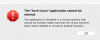
This is what I get when trying to start from an alias linked to the .app in my vm directory:
vmerror.png.png
Launching it from the parallels control panel is working fine.
 
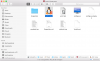
It points to the .app-package found inside the virtual machine package directory. That one, that gets highlighted in Finder when you right click the running virtual machine in the Dock, then choose "Show in Finder".

There aren't any links to the apllications inside at all, as I prefer to run my virtual machine in full screen and have disabled the application integration feature.
 
Clicking that results in the Parallels Control Panel beeing launched, but not in the actual VM beeing started.
 
Clicking that results in the Parallels Control Panel beeing launched, but not in the actual VM beeing started.
Alright. Please follow the steps I provided earlier in this thread, quoted below.
Please navigate to Apple Icon -> System Preferences -> Security & Privacy -> Privacy -> Accessibility and ensure that Parallels Desktop is both included in the list under 'Allow the apps below to control your computer' and is checked. Also, please open 'Parentals Controls' in System Preferences and ensure that parental controls are not enabled for your user account.
After performing these steps, check whether the alias you created for the .pvm file works now.
 
Already checked that. There's everything okay with these settings.
Please reproduce this scenario...
Clicking that results in the Parallels Control Panel beeing launched, but not in the actual VM beeing started.
....generate a Problem Report ID (refer to http://kb.parallels.com/9058 for assistance) when the issue occurs (very important) and reply with the report ID number. We'll then investigate.
 
Back
Top