In past versions of Parallels, I was able to make a desktop alias to my Parallels VM (e.g. Windows 7) and just double click the icon to run the Windows 7 VM on my Mac.
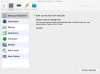
With Parallels 12, if I click on the Windows 7 desktop alias, it pops up the Parallels Control Center. If I double click the desktop icon again, it starts up the Windows 7 VM.
Is there any way I can just invoke the VM without having Control Center running/being invoked? I don't care to have Control Center run, I just want my VM to run. I also feel that having Control Center show a thumbnail of the live VM screen is just additional overhead on my Mac that I don't need or want. I'm a minimalist, I guess, and I also like to conserve my system resources the best I can.
Any suggestions would be greatly appreciated!
With Parallels 12, if I click on the Windows 7 desktop alias, it pops up the Parallels Control Center. If I double click the desktop icon again, it starts up the Windows 7 VM.
Is there any way I can just invoke the VM without having Control Center running/being invoked? I don't care to have Control Center run, I just want my VM to run. I also feel that having Control Center show a thumbnail of the live VM screen is just additional overhead on my Mac that I don't need or want. I'm a minimalist, I guess, and I also like to conserve my system resources the best I can.
Any suggestions would be greatly appreciated!