So I had no choice but to give up. Thanks for the script though. It at least gave me something to work with. Hope all is well.@LukasV2 once again, thank you for this! Question though: I'm running into an issue where on SQL 2022 Dev edition, I can't connect more than one user. I have several datasources with cached connections which is normally not a problem, but for some reason I can't have more than one connected. Do you think this is in any way related to your install script, or just a coincidence and I'm dealing with something else?
I've spent endless hours trying to figure this out (checking every setting under the sun) and at this point I'm just coming back to the installer you setup and am wondering if maybe I need to run it again with a different setting/switch or something.
Thanks!

Install the app
How to install the app on iOS
Follow along with the video below to see how to install our site as a web app on your home screen.
Note: This feature may not be available in some browsers.
You are using an out of date browser. It may not display this or other websites correctly.
You should upgrade or use an alternative browser.
You should upgrade or use an alternative browser.
SQL Server Update to Install on Windows for Arm
- Thread starter Mundford
- Start date
Thank you so much! Ran into your post early on & didn't realize that I needed to adjust security settings to run powershell script, after two days of being educated in everything that doesn't work, found your post again & worked perfectly. You are the man!I've created a script that can install SQL Server Express 2019 and 2022 in Parallels on M1. You can download it here: https://github.com/jimm98y/MSSQLEXPRESS-M1-Install. Just run the bat file and wait until it completes.
It turned out the problem is not in the SQL Server, but in their installation. The script just fixes the installation so that the service can be started. I've been able to successfully use the SQL Express for development after installing it this way.
So far the only drawback I know about is that the LocalDB feature is not working from the ARM64 version of the Visual Studio. It looks like the ARM64 VS is trying to load x64 DLLs from the SQL installation, which obviously won't work. Otherwise, ASP.NET apps can connect to the SQL Server instance and I am also able to use the SSMS to manage the databases.
I have a MBP M1 Pro and been trying a lot of methodes to get Sql server work but had not success with any method, finally decided to try it for the las time with other methode and FINALLY WORKED . Here it is:
-Install Parallels Versión 18.1.0 (53311)
-Download and install SQL SERVER 2014 ️"32 BIT VERSION ONLY"️ https://www.microsoft.com/en-us/download/details.aspx?id=42299
-Download and install SSMS 18.11.1 Version https://365tips.be/en/software-update-download-sql-server-management-studio-18-11-1-ssms/
ENJOY!
Working June 2023
Hope it works for for everyone who is dealing with that.
-Install Parallels Versión 18.1.0 (53311)
-Download and install SQL SERVER 2014 ️"32 BIT VERSION ONLY"️ https://www.microsoft.com/en-us/download/details.aspx?id=42299
-Download and install SSMS 18.11.1 Version https://365tips.be/en/software-update-download-sql-server-management-studio-18-11-1-ssms/
ENJOY!
Working June 2023
Hope it works for for everyone who is dealing with that.
Oooofff!!! finally, after so many attempts, I was able to succeed in installing and running an sql server on my Macbook Pro M1 Pro Ventura 13.2.
I've tried the solution provided by EricM6 and it worked. So long stories short:
I've downloaded and installed SQL SERVER 2014 ️32 BIT VERSION ONLY. Then, I tried the SSMS V19, which I've already installed on my machine. And BOOYA! It worked.
Oh, a small clarification, My Parallels v1.8.2 (23832) worked just fine!
Many thanks to the community for their help and especially to EricM6 without whom I would still be struggling.
I've tried the solution provided by EricM6 and it worked. So long stories short:
I've downloaded and installed SQL SERVER 2014 ️32 BIT VERSION ONLY. Then, I tried the SSMS V19, which I've already installed on my machine. And BOOYA! It worked.
Oh, a small clarification, My Parallels v1.8.2 (23832) worked just fine!
Many thanks to the community for their help and especially to EricM6 without whom I would still be struggling.
GutenbergD
Bit poster
Thank you!! It's work fine.Thank you LukasV2 for the amazing script. I'm finally able to use ssms.. And for those who run into errors while installing SQL in the first step. Copy the script to a local folder (C:\Temp) and run it from there. It looks like when running it from a network file path it won't work, as the PowerShell cannot access it.
GutenbergD
Bit poster
I've created a script that can install SQL Server Express 2019 and 2022 in Parallels on M1. You can download it here: https://github.com/jimm98y/MSSQLEXPRESS-M1-Install. Just run the bat file and wait until it completes.
It turned out the problem is not in the SQL Server, but in their installation. The script just fixes the installation so that the service can be started. I've been able to successfully use the SQL Express for development after installing it this way.
So far the only drawback I know about is that the LocalDB feature is not working from the ARM64 version of the Visual Studio. It looks like the ARM64 VS is trying to load x64 DLLs from the SQL installation, which obviously won't work. Otherwise, ASP.NET apps can connect to the SQL Server instance and I am also able to use the SSMS to manage the databases.
Thank you!! It's work fine for me.
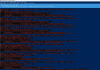 After executing the .bat, the SQL Server 2019 image is downloaded correctly, but when installing it, the error appears: Start-Process : This command cannot be executed due to the error: The system cannot find the file
specified.
In C:\temp\install2019Express.ps1: 72 Character: 5
+ Start-Process -FilePath $fullInstallerPath -ArgumentList "/q" -Wa ...
+ ~~~~~~~~~~~~~~~~~~~~~~~~~~~~~~~~~~~~~~~~~~~~~~~~ ~~~~~~~~~~~~~~~~
+ CategoryInfo : InvalidOperation:
 ) [Start-Process], InvalidOperationException
+ FullyQualifiedErrorId : InvalidOperationException,Microsoft.PowerShell.Commands.StartProcessCommand
HELP ME PLEASE!!!
Thank you so much LukasV2.I've created a script that can install SQL Server Express 2019 and 2022 in Parallels on M1. You can download it here: https://github.com/jimm98y/MSSQLEXPRESS-M1-Install. Just run the bat file and wait until it completes.
I just bought a Mac Studio M2 Ultra and went thru the installation process for SQL Server 2022 Developer Edition smoothly thanks to your work.
I will need to install SQL Server Agent now, will read thru the parameters and see if I can work it out.
BTW: at first, the batch didn't work. I had installed the default localized version of Windows (Italian in my case). I switched to English US, as I read the files mentioned in the .ps1 file were them, and retried, the second time it worked flawlessly.
Thanks again
Finally was able to install SQL 2012, 2014, 2016, and 2019 on Win 11 ARM. I am running VMware Fusion on MacbookPro M2 Max
Check the link below:
https://stackoverflow.com/questions...r-on-windows-11-running-on-parallels-on-mac-m
Check the link below:
https://stackoverflow.com/questions...r-on-windows-11-running-on-parallels-on-mac-m
I've created a script that can install SQL Server Express 2019 and 2022 in Parallels on M1. You can download it here: https://github.com/jimm98y/MSSQLEXPRESS-M1-Install. Just run the bat file and wait until it completes.
It turned out the problem is not in the SQL Server, but in their installation. The script just fixes the installation so that the service can be started. I've been able to successfully use the SQL Express for development after installing it this way.
So far the only drawback I know about is that the LocalDB feature is not working from the ARM64 version of the Visual Studio. It looks like the ARM64 VS is trying to load x64 DLLs from the SQL installation, which obviously won't work. Otherwise, ASP.NET apps can connect to the SQL Server instance and I am also able to use the SSMS to manage the databases.
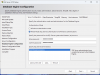
Hi LukasV2. Thanks for this script but unfortunately I need to create an SQL database instance with a specific instance name, mixed mode login, with a specific login name and password. I have found the places in the script to change the instance name but I don't know how to change the Authentication mode from the current Windows authentication mode to the Mixed mode (Windows and SQL Server Authentication) using your script. Can you please instruct me how I would do this with your script? It would be of great help to me. Thanks.
I am attaching a png file that shows the part of the the normal SQL Server installation which your script sets automatically and I would like to change.
Hi LukasV2, many thanks because you just saved my day! After several attemps, i found your script and it works. Finally I can get back to work now, have a nice day!I've created a script that can install SQL Server Express 2019 and 2022 in Parallels on M1. You can download it here: https://github.com/jimm98y/MSSQLEXPRESS-M1-Install. Just run the bat file and wait until it completes.
It turned out the problem is not in the SQL Server, but in their installation. The script just fixes the installation so that the service can be started. I've been able to successfully use the SQL Express for development after installing it this way.
So far the only drawback I know about is that the LocalDB feature is not working from the ARM64 version of the Visual Studio. It looks like the ARM64 VS is trying to load x64 DLLs from the SQL installation, which obviously won't work. Otherwise, ASP.NET apps can connect to the SQL Server instance and I am also able to use the SSMS to manage the databases.
Hola chicos, pude descargar SQL Server en mi Mac M1, y usar SSMS en Windows 11 mediante Parallels.
Solución: Instalen Docker y Azure Data Studio en su Mac siguiendo este video:
Luego utilicen este enlace: https://www.parallels.com/blogs/microsoft-sql-apple-silicon-docker-desktop/
En el server name: colocan la IP de su MAC; Authentication: SQL Server Authentication; Login: sa; Password: la que pusiste cuando usaste el primer link para Azure.
Y listo, esto es lo que me funciono a mi.
Solución: Instalen Docker y Azure Data Studio en su Mac siguiendo este video:
En el server name: colocan la IP de su MAC; Authentication: SQL Server Authentication; Login: sa; Password: la que pusiste cuando usaste el primer link para Azure.
Y listo, esto es lo que me funciono a mi.
GuiguiDaan
Bit poster
Hi everyone, just have a question, in order to install an accounting software on my M1 Pro, i have to activate FILESTREAM in my SQL SERVER. I have installed SQL Server 2014 (that successed only if i choose x86, x64 a fail) but if i activate FILESTREAM in SQL Server Management, i have directly an unknown error. So, the really question is it possible to activate this feature on my SQL Server in my M1 Pro or not ? If yes, how do you activate that ? I use a Windows 11 Pro ARM64
Regards
Regards
Confirmed the scripts work on M2 Macs running Parallels 19 Desktop and Windows 11 ARM64. Nice job!I've created a script that can install SQL Server Express 2019 and 2022 in Parallels on M1. You can download it here: https://github.com/jimm98y/MSSQLEXPRESS-M1-Install. Just run the bat file and wait until it completes.
It turned out the problem is not in the SQL Server, but in their installation. The script just fixes the installation so that the service can be started. I've been able to successfully use the SQL Express for development after installing it this way.
So far the only drawback I know about is that the LocalDB feature is not working from the ARM64 version of the Visual Studio. It looks like the ARM64 VS is trying to load x64 DLLs from the SQL installation, which obviously won't work. Otherwise, ASP.NET apps can connect to the SQL Server instance and I am also able to use the SSMS to manage the databases.
Hi LukasV2. Thanks for this script but unfortunately I need to create an SQL database instance with a specific instance name, mixed mode login, with a specific login name and password. I have found the places in the script to change the instance name but I don't know how to change the Authentication mode from the current Windows authentication mode to the Mixed mode (Windows and SQL Server Authentication) using your script. Can you please instruct me how I would do this with your script? It would be of great help to me. Thanks.
I am attaching a png file that shows the part of the the normal SQL Server installation which your script sets automatically and I would like to change.
View attachment 21146
Switching the instance into Mixed Mode is easy:
https://learn.microsoft.com/en-us/s...ver-authentication-mode?view=sql-server-ver16
Got super excited about this thread and recently tried to install Winsows 11 Pro and SQL Server (using LukasV2's script) on an M2 Mac.
I have IIS/ASP setup on a windows 10 VM on a 10 year old Mac Pro which works great. Installed everything on a new Macbook M2 Air, BUT it seems SQL Server runs extraordinary slow on Win 11 arm in parallels - so it's back to intel for me until performance improves.
I may give Docker a try and see if SQL Server runs better on that. Appreciate everybody's efforts/suggestions.
I have IIS/ASP setup on a windows 10 VM on a 10 year old Mac Pro which works great. Installed everything on a new Macbook M2 Air, BUT it seems SQL Server runs extraordinary slow on Win 11 arm in parallels - so it's back to intel for me until performance improves.
I may give Docker a try and see if SQL Server runs better on that. Appreciate everybody's efforts/suggestions.