
Install the app
How to install the app on iOS
Follow along with the video below to see how to install our site as a web app on your home screen.
Note: This feature may not be available in some browsers.
You are using an out of date browser. It may not display this or other websites correctly.
You should upgrade or use an alternative browser.
You should upgrade or use an alternative browser.
Snow Leopard Server stops working with Parallels 26 upgrade
- Thread starter warnergt
- Start date
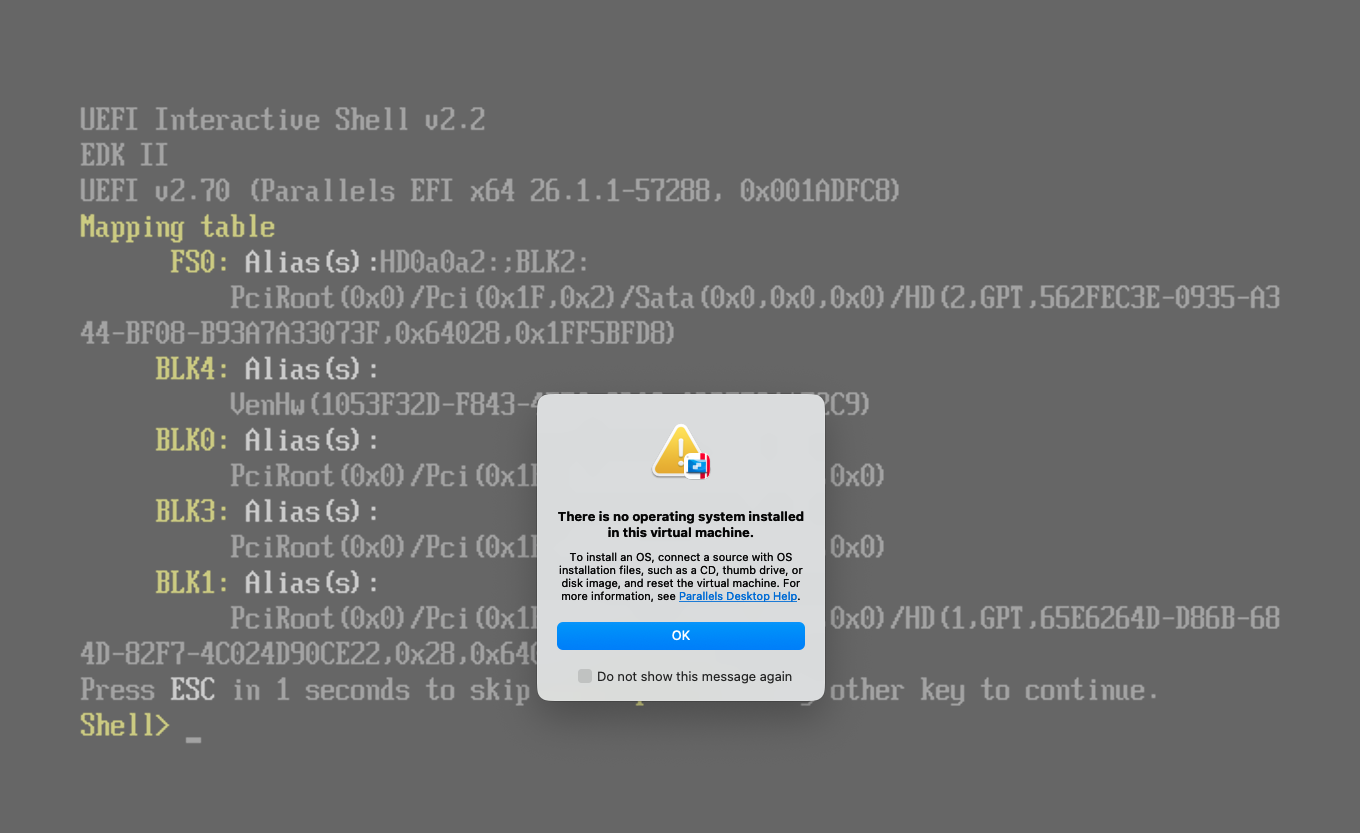
Same problem.
Snow Leopard Server stops working with Parallels 26 upgrade.
I upgraded Parallels from 20.4.1 to 26 and my Snow Leopard (MacOS 10.6) no longer boots.
Same problem: "UEFI Interactive Shell v2.2" ... I upgraded Parallels from 20.4.1 to 26.2.0 and 26.1.1 and 26.1.0 on Intel and my Snow Leopard (MacOS 10.6.8) no longer booted. However, my Snow Leopard VM booted again after I downgraded Parallels by installing version 20.4.1 which you can download here: https://download.parallels.com/desktop/v20/20.4.1-55996/ParallelsDesktop-20.4.1-55996.dmg . Until Parallels fixes their version 26.x, version 20.4.1 seems to be the last version that works with Snow Leopard. I hope this helps you too. You might need to reenter your Parallels license key (I didn't)
For what it's worth my Intel mac host runs MacOS Sequoia Version 15.7.3 (not the current Tahoe vs 26.2)Same problem: "UEFI Interactive Shell v2.2" ... I upgraded Parallels from 20.4.1 to 26.2.0 and 26.1.1 and 26.1.0 on Intel and my Snow Leopard (MacOS 10.6.8) no longer booted. However, my Snow Leopard VM booted again after I downgraded Parallels by installing version 20.4.1 which you can download here: https://download.parallels.com/desktop/v20/20.4.1-55996/ParallelsDesktop-20.4.1-55996.dmg . Until Parallels fixes their version 26.x, version 20.4.1 seems to be the last version that works with Snow Leopard. I hope this helps you too. You might need to reenter your Parallels license key (I didn't)
IvanExpert
Bit poster
Same issue here. VMWare Fusion (free these days, and better than I remember if you don't need a coherence-like environment) continues to run Snow Leopard without issue.
10.6.8 = won't boot
10.7.5 = won't boot
10.8.5 = won't boot
10.95 = WILL BOOT
and all later MacOS versions will boot.
They all install the Parallels26 version of Parallels Tools TWICE. First with the classic yellow dialog that has the brown chevrons, then after you reboot there's a new "reinstalling Parallels Tools" dialog with the blue-and-white Parallels logo on it. Meanwhile, Windows VMs of various versions don't seem to need new Parallels Tools installed, go figure!
10.7.5 = won't boot
10.8.5 = won't boot
10.95 = WILL BOOT
and all later MacOS versions will boot.
They all install the Parallels26 version of Parallels Tools TWICE. First with the classic yellow dialog that has the brown chevrons, then after you reboot there's a new "reinstalling Parallels Tools" dialog with the blue-and-white Parallels logo on it. Meanwhile, Windows VMs of various versions don't seem to need new Parallels Tools installed, go figure!
I had the same problem. I raised it with Parallels Support. I was eventually escalated to a higher level of support and they eventually advised me to downgrade to Parallels 20. The issue was reported to Level 2 engineering for a possible fix but none is promised. My guess is they won't do anything about it. I was also referred to the support article about non-Server versions of MacOS X even though it doesn't apply to my Server version of Snow Leopard. Seems clear that Parallels doesn't give a damn about customers with our use case. Not impressed at all.
it's not working on version 26.
only version 20 and full support version 19.
If you are upgrading to Parallels Desktop 26, note that the software no longer officially supports legacy virtual machines like Mac OS X Snow Leopard or Leopard. Due to Apple's modern macOS virtualization architectures (which dropped support for older OS environments), legacy macOS VM installations often "stop working" or freeze during the Parallels Tools installation
only version 20 and full support version 19.
If you are upgrading to Parallels Desktop 26, note that the software no longer officially supports legacy virtual machines like Mac OS X Snow Leopard or Leopard. Due to Apple's modern macOS virtualization architectures (which dropped support for older OS environments), legacy macOS VM installations often "stop working" or freeze during the Parallels Tools installation
Macintosh Rescue
Member
I think that VMware is probably the best solution for running old stuff as Parallels tends to focus on integrating the latest versions of Windows and Linux with macOS. Parallels have officially dropped support for the older guests whilst the VMware solution lets you choose machine versions.It is kinda ashame that Parallels cant migrate the older stuff , part of the reason of moving to Parallels was to get away from VMWare Fusion and Broadcom . So some stuff will have to remain there in Broadcom land.
The good thing at least with the move to Apple Hypervisor Framework is that you can run different virtualisation solutions together without conflict: I have Parallels, VirtualBox and UTM installed on the same machine and they work together nicely. If you really want rid of Broadcom I can attest that Mac OS X Server 10.6 will run on UTM with its QEMU backend.