M MarkM74 Bit poster Jan 16, 2026 #1 Desktop shortcuts are working fine when you login locally on the machine but if you login remotely using Parallels Windows Client, shortcuts are not clickable and do not work. Happens to several users. Client is on the latest version.
Desktop shortcuts are working fine when you login locally on the machine but if you login remotely using Parallels Windows Client, shortcuts are not clickable and do not work. Happens to several users. Client is on the latest version.
dvoijen Bit poster Jan 22, 2026 #2 Same here, latest version gives these issues. Tomorrow we have a phone call to see.
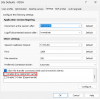
dvoijen Bit poster Jan 23, 2026 #3 The saw the issue, it is a bug. Workaround is to disable drive redirection cache:
T TimK18 Bit poster Apr 7, 2026 #5 I have the same problem, disabling the drive redirection cache worked. Any updates on this from Parallels?
I have the same problem, disabling the drive redirection cache worked. Any updates on this from Parallels?