Hi!
Filling screen on my MacBook Pro 16 M1 Pro has stopped working properly for full screen mode around parallels 18.3.X. Previously VM would fill the whole screen (but the notch), now when I enter the full screen black bars are displayed on the left and right sides of my screen. What's even worse this behaviour is pretty buggy and if I close the VM (but not parallels) sometimes the borders are still present on the Mac host desktop.
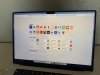
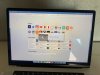
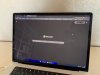
I attach three screenshots: one with the fullscreen problem, second one where the borders disturb the main host, third one that indicates how the screen should normally look like.
Things I have already done:
1. Reinstalled Parallels
2. Reinstalled Parallels tools
3. Tried all the Full Screen > Advanced > Stretch/Keep/Auto/Off options (previously it has always been on auto)
4. Tried changing resolution in Windows settings
Filling screen on my MacBook Pro 16 M1 Pro has stopped working properly for full screen mode around parallels 18.3.X. Previously VM would fill the whole screen (but the notch), now when I enter the full screen black bars are displayed on the left and right sides of my screen. What's even worse this behaviour is pretty buggy and if I close the VM (but not parallels) sometimes the borders are still present on the Mac host desktop.
I attach three screenshots: one with the fullscreen problem, second one where the borders disturb the main host, third one that indicates how the screen should normally look like.
Things I have already done:
1. Reinstalled Parallels
2. Reinstalled Parallels tools
3. Tried all the Full Screen > Advanced > Stretch/Keep/Auto/Off options (previously it has always been on auto)
4. Tried changing resolution in Windows settings