Screen display in Catalina VM not fullwidth

KarljurgenF

Bit poster
Before taking the risk of some software not working in Catalina, I decided to set up a VM to test it in there.
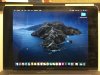
No problems with installation, however... on my MacBook Pro 15", it doesn't use the full screen; there is about an inch bar on left and right (rather like watching a 16:9 programme on a widescreen TV; see attached).

Is this normal (i.e., a feature of Catalina) or is there a way to tweak it? I don't see any option to do that....

Thanks

Karljürgen
 

Attachments

  • IMG_2967A.JPG
    IMG_2967A.JPG
    776.8 KB · Views: 11
Before taking the risk of some software not working in Catalina, I decided to set up a VM to test it in there.
No problems with installation, however... on my MacBook Pro 15", it doesn't use the full screen; there is about an inch bar on left and right (rather like watching a 16:9 programme on a widescreen TV; see attached).

Is this normal (i.e., a feature of Catalina) or is there a way to tweak it? I don't see any option to do that....

Thanks

Karljürgen
Hi KarljurgenF. Please start the virtual machine, select Actions (from the Mac menu bar) -> Reinstall Parallels Tools. Once the tools are installed successfully, please restart the VM and check if it works fine.
 
Hi
Thanks for this. It was exceedingly painful to do (ultra slow, despite a top-of-the-line machine) and I had to try a few times since I thought the process was stuck... but in the end it worked out ok. (Install, as opposed to Reinstall, which wasn't listed.)
I guess Catalina must be a real hog and not suited to a VM, but for testing it out I suppose I can live with it.
K
 
Hi All,
I have a similar issue.
MBP 16-inch, 2019 running macOS Catalina 10.15.2
Monitor native resolution is: 3440 x 1440
Full-screen with Windows 10 guest (this works as expected)
Full-screen with macOS Catalina guest, the resolution stays at the resolution prior to going full-screen (black letter boxing - top/bottom or left/right).
When in Coherence mode resolution is: 3440 x 1337 (close enough)
I can drag the window to get 3440 x 1298, if I enter full-screen this stays with black bands at the top and bottom.
I have installed parallel tools twice. I believe they are running because changing resolutions does work.
I have tried various combinations of Full Screen and Graphics settings (including setting game mode) with no change.
Any suggestions are welcome.
Thanks,
Eric
 
Back
Top