P
Parallels User
This used to work fine with Parallels 12 but seems to be broken in Parallels 13.
What I did:
1 - I was prompted that there was a new version of parallels available.
2 - I did shut down my Bootcamp Windows 10 running on an external SSD.
3 - I let the update run through.
4 - I tried to start my Bootcamp Windows but now, Parallels does not seems to be able locate the Bootcamp partition.
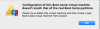
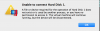
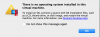
5 - I get 3 successive error messages attached as Error1, Error2 and Error3.
6 - Stopped the Virtual machine
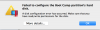
7 - When I access my HD configuration, I see my HD selected. If I select it again in the drop down menu I get Error4. More details... gives this:
Error: PRL_ERR_DISK_PARTITION_NOT_FOUND (0x80021053)
Path: '/Users/<user>/Documents/Parallels/Bootcamp.pvm/OTG V2 OTG V2 (disk2).hdd'
8 - I decided to inspect the content of the my Bootcamp VM and discovered that the .hdd file is missing in the VM. Having done a backup of my VM before updating, I still had a copy of the .hdd file so I copied it back un the VM content. I discovered that as soon as I start the VM or try to configure the HD, the .hdd file now gets deleted in Parallels 13.
9 - I then tried to create the Bootcamp VM anew but at the moment of binding the HD, it failed with the same error (Error4) above.
10 - I uninstalled Parallels 13 and installed Parallels 12 back. Restored my Bootcamp VM which I previously made a copy of. Everything went back to working perfectly fine.
Having read on the forums that some people experienced issues when updating to Parallels 13 from Parallels 12 without restarting the application or the Mac. (As Parallels 13 update process never prompts the user to.) I decided to uninstall Parallels 12 manually and install Parallels 13 manually. That time, I was prompted to restart my Mac. After restarting, I tried to launch my Bootcamp VM which was just working with Parallels 12 and got the same errors as mentioned at step 5.
So I reverted to Parallels 12 again and got on with my workday. For the sake of getting the best error report, I did installed Parallels 13 a third time tonight so I can grab screenshots and get the exact error messages. This is not an issue related with a bad manipulation of the HD since it remained connected all the time and did worked perfectly with Parallels 12. Nor is bogus issue related to the installation context since I've reproduced the problem three time in three tries.
For now I will keep working under Parallels 12 since all seems to be working fine, but as a paying customer, I'd like to get the new goodies like everyone.
What I did:
1 - I was prompted that there was a new version of parallels available.
2 - I did shut down my Bootcamp Windows 10 running on an external SSD.
3 - I let the update run through.
4 - I tried to start my Bootcamp Windows but now, Parallels does not seems to be able locate the Bootcamp partition.
5 - I get 3 successive error messages attached as Error1, Error2 and Error3.
6 - Stopped the Virtual machine
7 - When I access my HD configuration, I see my HD selected. If I select it again in the drop down menu I get Error4. More details... gives this:
Error: PRL_ERR_DISK_PARTITION_NOT_FOUND (0x80021053)
Path: '/Users/<user>/Documents/Parallels/Bootcamp.pvm/OTG V2 OTG V2 (disk2).hdd'
8 - I decided to inspect the content of the my Bootcamp VM and discovered that the .hdd file is missing in the VM. Having done a backup of my VM before updating, I still had a copy of the .hdd file so I copied it back un the VM content. I discovered that as soon as I start the VM or try to configure the HD, the .hdd file now gets deleted in Parallels 13.
9 - I then tried to create the Bootcamp VM anew but at the moment of binding the HD, it failed with the same error (Error4) above.
10 - I uninstalled Parallels 13 and installed Parallels 12 back. Restored my Bootcamp VM which I previously made a copy of. Everything went back to working perfectly fine.
Having read on the forums that some people experienced issues when updating to Parallels 13 from Parallels 12 without restarting the application or the Mac. (As Parallels 13 update process never prompts the user to.) I decided to uninstall Parallels 12 manually and install Parallels 13 manually. That time, I was prompted to restart my Mac. After restarting, I tried to launch my Bootcamp VM which was just working with Parallels 12 and got the same errors as mentioned at step 5.
So I reverted to Parallels 12 again and got on with my workday. For the sake of getting the best error report, I did installed Parallels 13 a third time tonight so I can grab screenshots and get the exact error messages. This is not an issue related with a bad manipulation of the HD since it remained connected all the time and did worked perfectly with Parallels 12. Nor is bogus issue related to the installation context since I've reproduced the problem three time in three tries.
For now I will keep working under Parallels 12 since all seems to be working fine, but as a paying customer, I'd like to get the new goodies like everyone.