Is there a way to move all the trashed items that Find Duplicates put in my trash back to where they came from on my computer? I thought I was telling Find Duplicates to put 1 video in the trash. It put every duplicate it found in my trash. Undo is grayed out in the application. The items in the trash have lost their paths back to where they came from and it is hundreds of files.

Install the app
How to install the app on iOS
Follow along with the video below to see how to install our site as a web app on your home screen.
Note: This feature may not be available in some browsers.
You are using an out of date browser. It may not display this or other websites correctly.
You should upgrade or use an alternative browser.
You should upgrade or use an alternative browser.
Reverse duplicates put in trash
- Thread starter JudyR1
- Start date
-
- Tags
- undo find duplicates
P
Parallels User
Hello,
Did you find a solution? This just happened to me - 900,000 files!
All the best
Tim
Did you find a solution? This just happened to me - 900,000 files!
All the best
Tim

P
Parallels User
Hello,
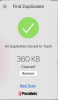
Find Duplicates tool allows to restore deleted filed from the Trash (if you haven't closed the tool yet) - 'Restore' button appears after deleting the files.
Hello,
I had to close the tool because 900,000 + files went to trash!
I only selected one file to delete??? The one at the top which was a 13gb zip file - there were two copies, so I ticked one and clicked 'move to trash'
Now I'm afraid to even open this app again.

sergk
Parallels Developers
I attached a file with Apple script. This script goes through all files in Trash and put them back one by one. What you need:
- extract script from attached file (restoreFilesFromTrash.zip);
- double click on file in Finder. Apple Script application will appear;
- press on 'play' button to launch script;
- wait till completion;

- extract script from attached file (restoreFilesFromTrash.zip);
- double click on file in Finder. Apple Script application will appear;
- press on 'play' button to launch script;
- wait till completion;
Attachments
P
Parallels User
hello and thanks - please can you help me understand why 900,000 files were moved to the trash? - 95% of them aren't even duplicates
sergk
Parallels Developers
Are you sure that all of these files have been removed by Find Duplicates tool? When tool starts it find duplicates in some location you've provided. Then you decide which files should be deleted and which not. Then tool removes only duplicates selected for removal. Tool doesn't delete file if no duplicates were found for it.
Let's check time when files were put into the Trash:
- Open Trash
- Click on title of file list
- Check 'Date Added'
New column 'Date Added' will appear in file list. It shows when file was put into the Trash. If all files have similar date then in may be result of "Find Duplicates" working, otherwise - not.
I also added video instruction.
Let's check time when files were put into the Trash:
- Open Trash
- Click on title of file list
- Check 'Date Added'
New column 'Date Added' will appear in file list. It shows when file was put into the Trash. If all files have similar date then in may be result of "Find Duplicates" working, otherwise - not.
I also added video instruction.
Attachments
P
Parallels User
the trash was empty when I started - it's full of files that aren't duplicates - Find Duplicates is the only thing I did with the computer - I've been a Mac user for 20 years, this never happened before - I only installed Parallel Toolbox 2 days ago.
Now I'm moving the files 1000 at a time and will do a clean install on the Mac - at least it will run better when this is all over! But I won't be using Toolbox again! Bad experience
Now I'm moving the files 1000 at a time and will do a clean install on the Mac - at least it will run better when this is all over! But I won't be using Toolbox again! Bad experience
P
Parallels User
even my browser bookmarks are gone - and some software won't work
I downloaded the zip-file, Apple Script Editor opened it, the same window like yours opens and same contents is visible. Hitting play: it needs some seconds, than the trash starts flashing and the contents of the trash changes while the sripts seems working. When the trash stops flashing (around an hour, 4500 items, 15GB), nothing has changed: the trash is full like before (Mac OS 10.14.6).
Greetings,Hello,
Find Duplicates tool allows to restore deleted filed from the Trash (if you haven't closed the tool yet) - 'Restore' button appears after deleting the files.
View attachment 17305 View attachment 17306
I just used the find duplicates tool and it erased most of my files from my computer and from all the cloud drives. Now there are'n any files. I tried to locate the undo button, but it's going. Is it because I closed the app? power down the computer? How can I recover my files. It basically erased most of my files!

Aydaskhan Asochakov
Parallels Support
Greetings,
I just used the find duplicates tool and it erased most of my files from my computer and from all the cloud drives. Now there are'n any files. I tried to locate the undo button, but it's going. Is it because I closed the app? power down the computer? How can I recover my files. It basically erased most of my files!
Greetings,
We've created a follow-up ticket to assist you further.
Please check your [email protected] email inbox.

NikolaiS@Parallels
Staff member
Hello,
A quick update on the situation.
The inability to restore files once "Find Duplicates" has been closed (there is a "restore" button right after files have been moved to Trash), is due a known macOS issue submitted a while back ( https://openradar.appspot.com/41878624 ) that makes the system "forget" original locations of files that have been deleted programmatically. Hence, restoring them to that original location becomes impossible.
And unfortunately, the script suggested earlier does not apply here: this is a simple script that restores deleted files. And just as regular restoration of deleted files, it only works for files that the system remembers the original location of, but due to https://openradar.appspot.com/41878624 there is no original location stored, hence the script does not apply to this case.
A knowledge base article outlining this peculiarity has been published: https://kb.parallels.com/en/129413
A quick update on the situation.
The inability to restore files once "Find Duplicates" has been closed (there is a "restore" button right after files have been moved to Trash), is due a known macOS issue submitted a while back ( https://openradar.appspot.com/41878624 ) that makes the system "forget" original locations of files that have been deleted programmatically. Hence, restoring them to that original location becomes impossible.
And unfortunately, the script suggested earlier does not apply here: this is a simple script that restores deleted files. And just as regular restoration of deleted files, it only works for files that the system remembers the original location of, but due to https://openradar.appspot.com/41878624 there is no original location stored, hence the script does not apply to this case.
A knowledge base article outlining this peculiarity has been published: https://kb.parallels.com/en/129413
Please I need help too! I did exactly the same thing and launched the duplicates app from Toolbox and I accidentally put 9000 files to the bin. I'm afraid of losing important files and am in desperately need of help! How do I put them back into their place even after closing Toolbox/duplicates app? I tried the script but it did nothing at all. I can't afford to lose my files, I have extremely important data that I can't lose, and I can't simply put 9.000 files back manually into their original locations. Please help me find a solution to this, your duplicates app is not intuitive at all and needs an OBVIOUS interface update.Greetings,
We've created a follow-up ticket to assist you further.
Please check your [email protected] email inbox.
Aydaskhan Asochakov
Parallels Support
Greetings RafaelG7,Please I need help too! I did exactly the same thing and launched the duplicates app from Toolbox and I accidentally put 9000 files to the bin. I'm afraid of losing important files and am in desperately need of help! How do I put them back into their place even after closing Toolbox/duplicates app? I tried the script but it did nothing at all. I can't afford to lose my files, I have extremely important data that I can't lose, and I can't simply put 9.000 files back manually into their original locations. Please help me find a solution to this, your duplicates app is not intuitive at all and needs an OBVIOUS interface update.
We strongly recommend you to check the post above. For your convenience, we will duplicate it below:
Hello,
A quick update on the situation.
The inability to restore files once "Find Duplicates" has been closed (there is a "restore" button right after files have been moved to Trash), is due a known macOS issue submitted a while back ( https://openradar.appspot.com/41878624 ) that makes the system "forget" original locations of files that have been deleted programmatically. Hence, restoring them to that original location becomes impossible.
And unfortunately, the script suggested earlier does not apply here: this is a simple script that restores deleted files. And just as regular restoration of deleted files, it only works for files that the system remembers the original location of, but due to https://openradar.appspot.com/41878624 there is no original location stored, hence the script does not apply to this case.
A knowledge base article outlining this peculiarity has been published: https://kb.parallels.com/en/129413