I am trying to update Windows 10 to 11 and Windows does not recognize the TPM.
I originally had a legacy partition and have already changed that to a UEFI partition. When I look at the guest OS configuration hardware, I do not see "TPM" listed there. So I modified the config.pvs and added <enable>1</enable> to the Tpmchip section. I also changed EFI*** to 1. Then, the TPMs are found in the configuration.
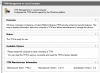
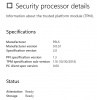
Every time I start Windows 10, Parallels warns me about TPM and asks if I want to force start or stop. And I am able to force start Windows with no problems. I run the tpm.msc command and it says "no compatible TPM". When I run the MS-provided verification application, it points out that you need TPM 2.0.
How do I get Windows to recognize the TPM?
---
Parallels Desktop for Mac 17.1.2, macOS 12.3
I originally had a legacy partition and have already changed that to a UEFI partition. When I look at the guest OS configuration hardware, I do not see "TPM" listed there. So I modified the config.pvs and added <enable>1</enable> to the Tpmchip section. I also changed EFI*** to 1. Then, the TPMs are found in the configuration.
Every time I start Windows 10, Parallels warns me about TPM and asks if I want to force start or stop. And I am able to force start Windows with no problems. I run the tpm.msc command and it says "no compatible TPM". When I run the MS-provided verification application, it points out that you need TPM 2.0.
How do I get Windows to recognize the TPM?
---
Parallels Desktop for Mac 17.1.2, macOS 12.3