Repetitive "macOS Detected" notification

mcgroarty

Member
Occasionally, Parallels Desktop gets stuck in a loop where it keeps showing a "macOS Detected - Click to install macOS" notification over and over again. I can turn off notifications to stop it, but I can see in the notification center that the time is always "now" which means it's continuing to issue that notification.

Does anyone else get this, or know what causes it?

I do have both Acronis True Image 2019 and Bitdefender Antivirus installed, which are probably the only really nonstandard things I have that might conflict with Parallels. I also have 24 virtual machines, which might be more than most people, but I only have one VM actually running when this is happening.

* macOS Mojava 10.14.1
* iMac Pro
* Parallels 14.1.0 (45387)
* Acronis True Image 2019 23.4.17000
* Bitdefender Antivirus 7.2.1.6
 
Occasionally, Parallels Desktop gets stuck in a loop where it keeps showing a "macOS Detected - Click to install macOS" notification over and over again. I can turn off notifications to stop it, but I can see in the notification center that the time is always "now" which means it's continuing to issue that notification.

Does anyone else get this, or know what causes it?

I do have both Acronis True Image 2019 and Bitdefender Antivirus installed, which are probably the only really nonstandard things I have that might conflict with Parallels. I also have 24 virtual machines, which might be more than most people, but I only have one VM actually running when this is happening.

* macOS Mojava 10.14.1
* iMac Pro
* Parallels 14.1.0 (45387)
* Acronis True Image 2019 23.4.17000
* Bitdefender Antivirus 7.2.1.6
Hi mcgroarty. Please provide the screenshot of the message to check and assist further. Also, let us know which virtual machine is running while you receive the message?
 
Hi,
We'd appreciate if you could do the next:
Please go to the menu of Parallels Desktop -> Window -> Control Center. Then Parallels Desktop -> Preferences -> Advanced and enable option "Use detailed log messages". Then, when problem arises a couple of times, please go to the Help -> Send Technical data. Send the report a and post here its number
 
Hi,
same to that annoying behaviour! When will it be solved?
We'd appreciate if you could do the next:
Please go to the menu of Parallels Desktop -> Window -> Control Center. Then Parallels Desktop -> Preferences -> Advanced and enable option "Use detailed log messages". Then, when problem arises a couple of times, please go to the Help -> Send Technical data. Send the report a and post here its number
 
Just a little more data for this: I am also running BitDefender on both Mac and Windows 10 VPC. One VPC only. Same repetitive message shortly after BitDefender AND MacOS updated. If it happens again (I'm busy and just shut down Parallels to avoid it) I'll capture the log data and submit it.
MacOS now 10.14.4.
BitDefender AV for Mac 7.2.2.1
 
Same issue happened with me. Bitdefender on my Mac was running a scan, then suddenly Parallels kept notifying me of MacOS detected, but the notification would disappear, then appear again several times. After a while it stopped and hasn't started again.
 
I recently started to experience the same problem.
Technical Data sent with Technical Report 323307449.
I couldn't get a screenshot unfortunately, I'll getting a screenshot if it happens again.
 
Hi,
We'd appreciate if you could do the next:
Please go to the menu of Parallels Desktop -> Window -> Control Center. Then Parallels Desktop -> Preferences -> Advanced and enable option "Use detailed log messages". Then, when problem arises a couple of times, please go to the Help -> Send Technical data. Send the report a and post here its number
Hi, I have encountered the same problem, but I know exactly when this happened:
This problem occurred when I was running a virus scanning in Mac OS:10.14.6 using Bitdefender. Just for your background information, I have installed Bitdefender on both Windows OS and Mac OS. Therefore, I don't know which of them caused the problem. At the time when this thing occurred, only Mac OS was running a virus scanning.
 
Has this been resolved? I just started experiencing this. I think my ClamXAV was running a background scan at the time.
 
It's still doing it every time the antivirus scans the whole drive. I think the message shows up, because I have XCode installed. A checkbox option in Parallels preferences "notify when a new OS is detected" would fix the problem... I could just untick it.
 
This has been happening to me since the upgrade to Parallels 15. I have been using Parallels since 2010 and have never experienced this problem.
 
I am having this problem too. When is this going to be fixed?
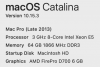
Here is my system info:
View attachment 15892
Hi, could you please provide us with more detailed issue description and also go to the menu of Parallels Desktop -> Window -> Control Center. Then Parallels Desktop -> Preferences -> Advanced and enable option "Use detailed log messages". Then, when problem arises a couple of times, please go to the Help -> Send Technical data. Send the report a and post here its number
 
Has this been resolved? I just started experiencing this. I think my ClamXAV was running a background scan at the time.
I am having the same issue Catalina 10.15.4, Parallels 15.1.4 (47270) and ClamXAV 3.0.15(8328)/0.101.4_02 1025.1036. Seems to happen only, while ClamXAV is touching certain Parallels-related files. It just stopped.
 
Back
Top