Removing duplicate USB device listings? ('Thing' #2,3,4,5 etc.)

MikeK5

Bit poster
I have a few USB devices that Parallels can't seem to remember.
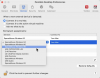
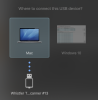
Randomly when I reconnect one of these devices I will get the prompt to connect to Mac or Windows. I make the assignment permanent, and everything works fine for a while. However, when this happens Parallels creates another entry under Preferences->Devices->Permanent Assignment so I end up with a mess of items.
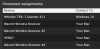
I have 11 entries for a single Wacom tablet, 13 for a single Whistler device.... and so on:
Screen Shot 2019-05-08 at 8.44.33 AM.png Screen Shot 2019-05-08 at 8.47.59 AM.png

How do I stop this from happening and remove the duplicates?
 
It is not possible to generate a problem report when this happens as the help and icon drop-down menu are both greyed out while the "Where to connect this USB Device" screen is shown.

Also, to be clear here, no error is shown within Parallells. The problem is the same USB device is recognized as 'new' most times it is plugged in, leading to duplicates in the list. Want those dupes gone, and to not have to re-select 'where to connect the USB device' each time.

Thanks!
 
I have created a Support Ticket 4580315 for this as well. Thanks for helping out!
If not possible to prevent this behavior, please provide a step-by-step to delete the duplicate devices.
 
Parallels team, I have generated a new Technical Report number 449566354 as per Sanjay Chin, the customer support engineer assigned to my ticket
4580315. Also note the older Technical Report number 449413400 cited in my above post. I can reproduce the issue consistently within Parallels Pro, independently of any virtual machine and Parallels Tools. To reproduce, I simply change the attached USB topology and Parallels generates a new #n suffix for the device (where n is an incrementing number). This issue appears mostly when I am docking/undocking the workstation, and when I am connecting/disconnecting USB devices. Note that a USB device does not have to be in Passthrough mode, or even added to the list, in order to become duplicated.
I have uploaded a short video, presumably linked to my ticket 4580315. I have attached a frame from it showing the duplication issue.
Thanks team for helping out!
 

Attachments

  • Screenshot 2024-01-31 at 07.45.13.png
    Screenshot 2024-01-31 at 07.45.13.png
    256.6 KB · Views: 4
Back
Top