Remove Parallels Access Sound Driver on Mac M1 Sonoma

AMDigitalExp

AMDigitalExp
Hello,
after removing parallels I'm looking for a way to remove the Parallels Access Audio virtual driver. I can't find any tracks in the folders through finder. Has anyone succeeded in this arduous undertaking?
I'm on a MAC M1 running Sonoma 14.6.
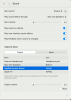
 

Attachments

  • Screenshot 2024-07-17 at 18.45.24.png
    Screenshot 2024-07-17 at 18.45.24.png
    64.2 KB · Views: 22
I have this same problem. It's really too bad Parallels sunsetted Access and I used it all the time. But how do we remove the Sound setting on macOS? I'm running macOS Sequoia (v15).
 
I have the same issue. Tried searching for it in plists, etc and found reference to com.parrallels.access in 2 plists: com.apple.audio.DeviceSettings.plist and com.apple.audio.SystemSettings.plist but not sure how to remove it and I don't want to mess up these system plists...
 
Hello, this is driving me crazy too. I found a list of drivers in the HAL folder, none of which explicitly are have "parallels" in the name. What was the name of the driver(s) that you deleted? At school it is mandatory to use Proctorio software, which detects "virtual sound" which is what parallels access sound shows up as. Very frustrating as I cannot take tests..
 
Back
Top